How to Add Your Bank Account to BetSS
calendar_today
May 23, 2026
visibility
64 Views
language
English
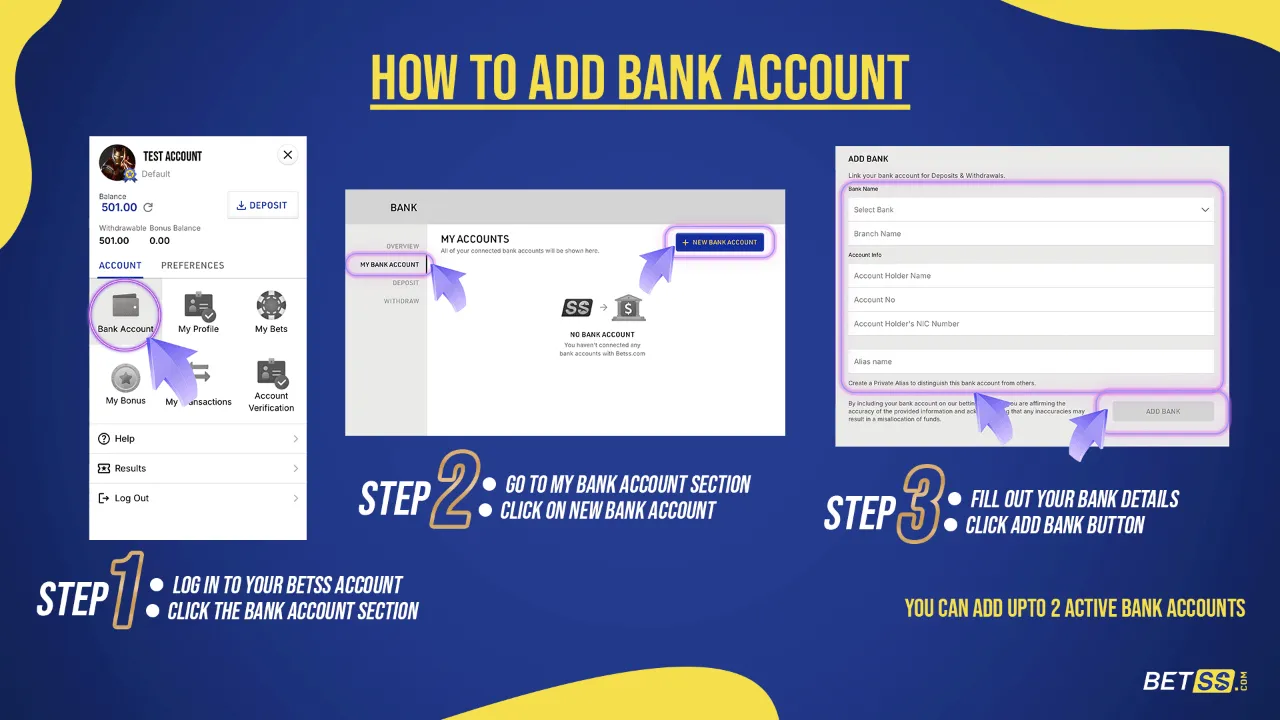
🏦 How to Link Your Bank Account
Follow these simple steps to securely link your bank account:
- Log in to your BetSS account and click the profile icon
- Go to Account → Bank Account → My Bank Account
- Click on Add Bank Account

📝 Enter Your Bank Details
Please provide the following information accurately:
- Select your Bank
- Enter Branch Name
- Add Account Holder Name
- Enter Account Number
- Provide Account Holder’s NIC Number
- Click Save / Submit

✅ Verification Status
- Your bank account will be successfully added after verification
⚠️ Important Notes
- When entering your Name and Bank/Branch Name, do NOT use spaces
- Using spaces may cause the process to fail
📌 Additional Information
- You can add up to 2 active bank accounts