
All Guides

Step-by-step instructional modules for every platform feature.

Platform Guides
English

How to Claim Your Free Welcome Bonus

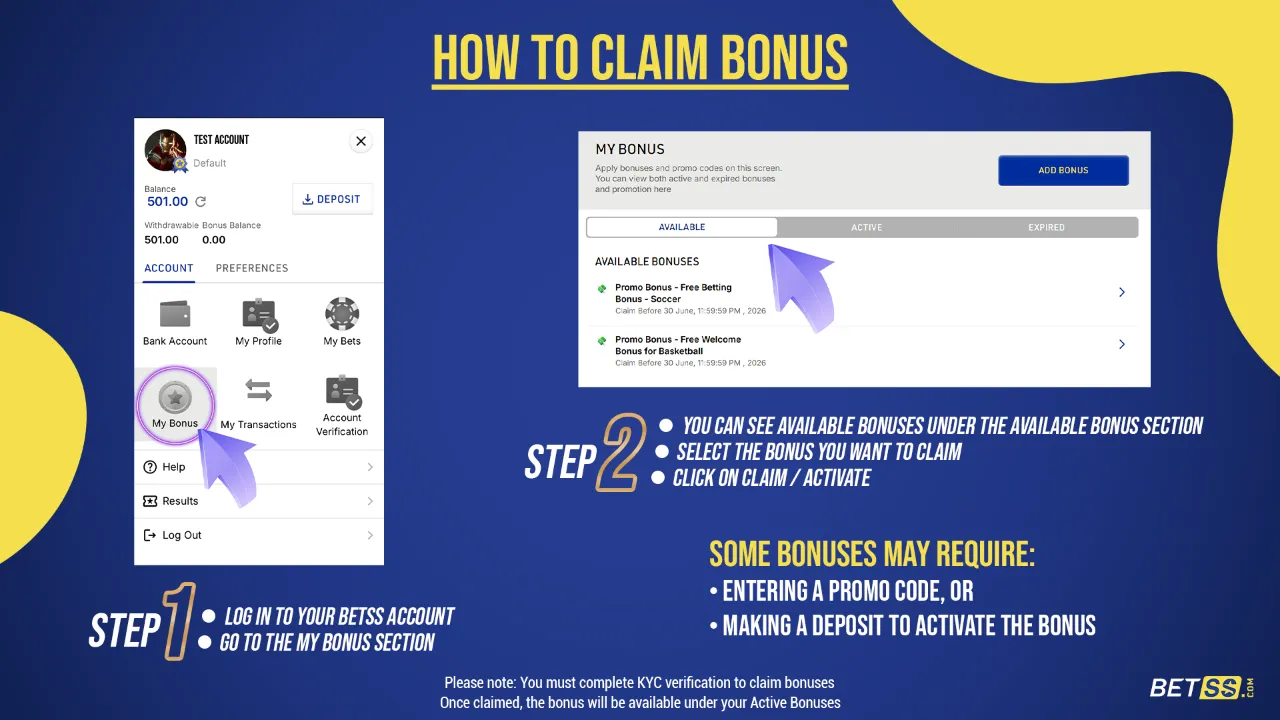
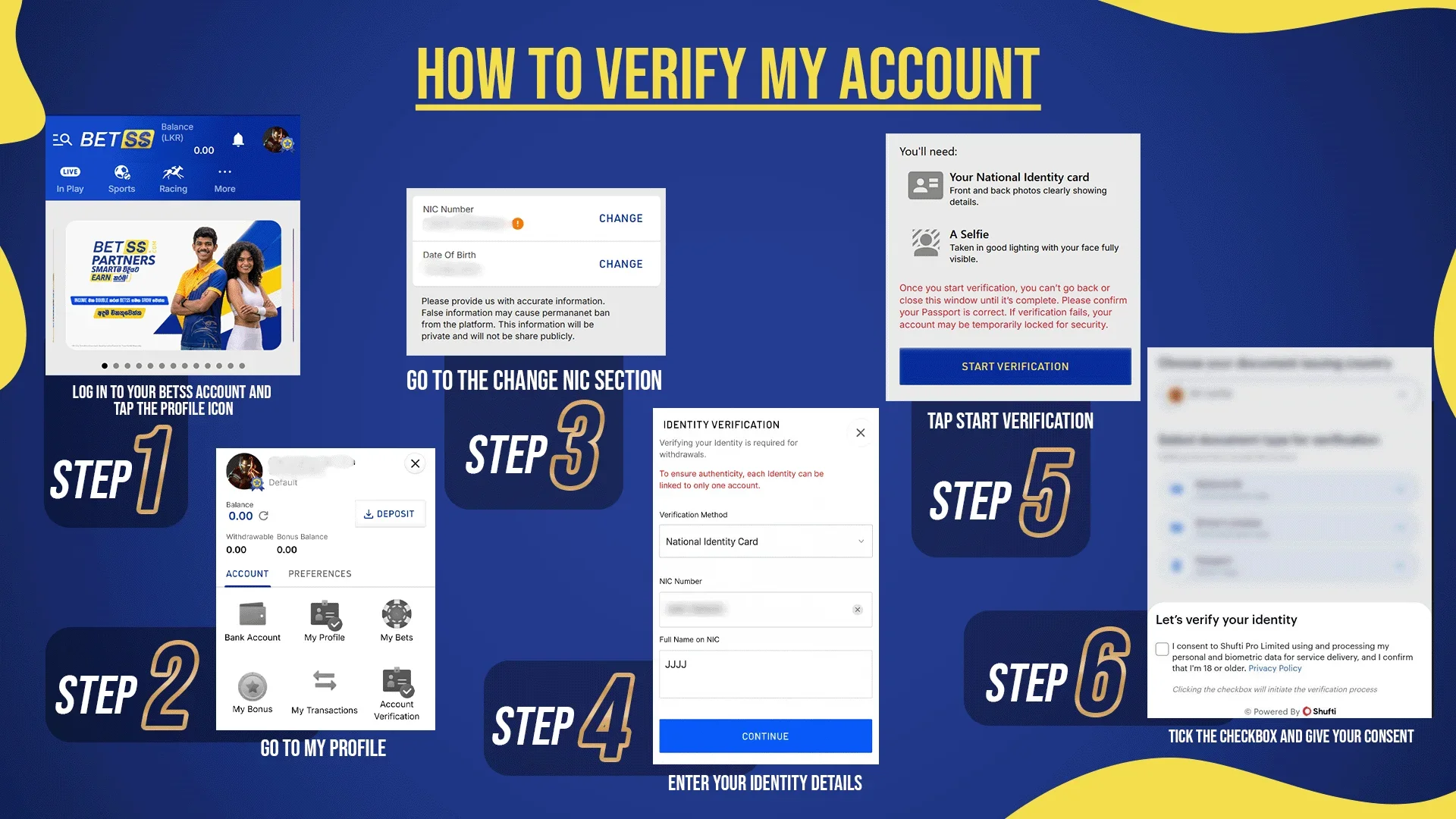
How to Claim Your Rs. 1000 Bonus Following are the simple steps for claim the welcome bonus: Log in to your BETSS account. Click Profile Icon Navigate to the “My Bonus” section. Select the "Welcome Bonus for Sports" promotion from "Available Bonus" section or Enter the Promo Code ("SPORT") Use your Rs.1,000 free bonus and start playing! 🔍 Important Rules & Tips New Customers Only: Valid for first-time users only. KYC Verification: Mandatory for claim any bonus 1x Wagering: Bonus must be wagered once (only winning stake counts). Play Fair: Opposite betting on the same event is not allowed. Category Use: Bonus can be used only for sports Min. Odd: 1.2 7-Day Validity: Use your bonus within 7 days. One per Customer: Multiple accounts are not allowed. ⚠️ If your bonus balance drops below the minimum stake after settlement, the bonus will be forfeited. 🚀 Quick Start Guide Learn how to Create an Account on BETSS Learn how to Complete KYC Verification for any bonus claim & smooth withdrawals Learn how to Place a Bet.

සිංහල

ඔබගේ ජංගම දුරකථන අංකය වෙනස් කිරීමට කළ යුතු දේ

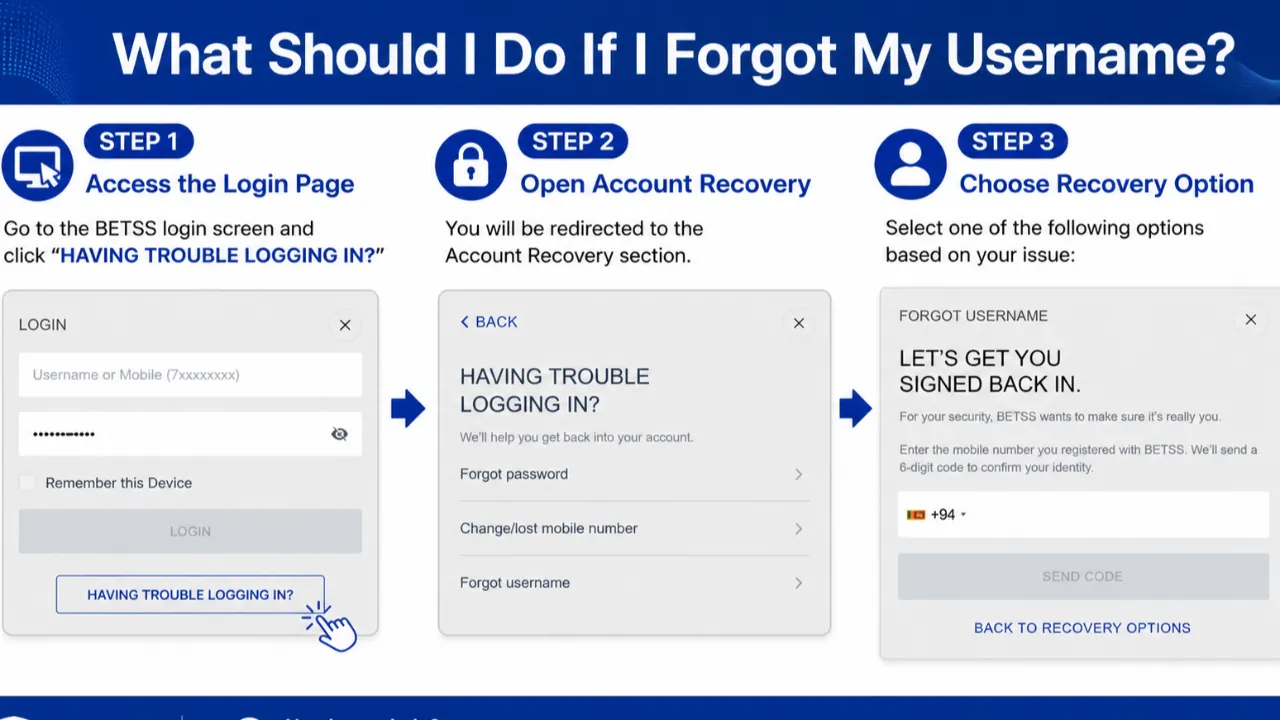
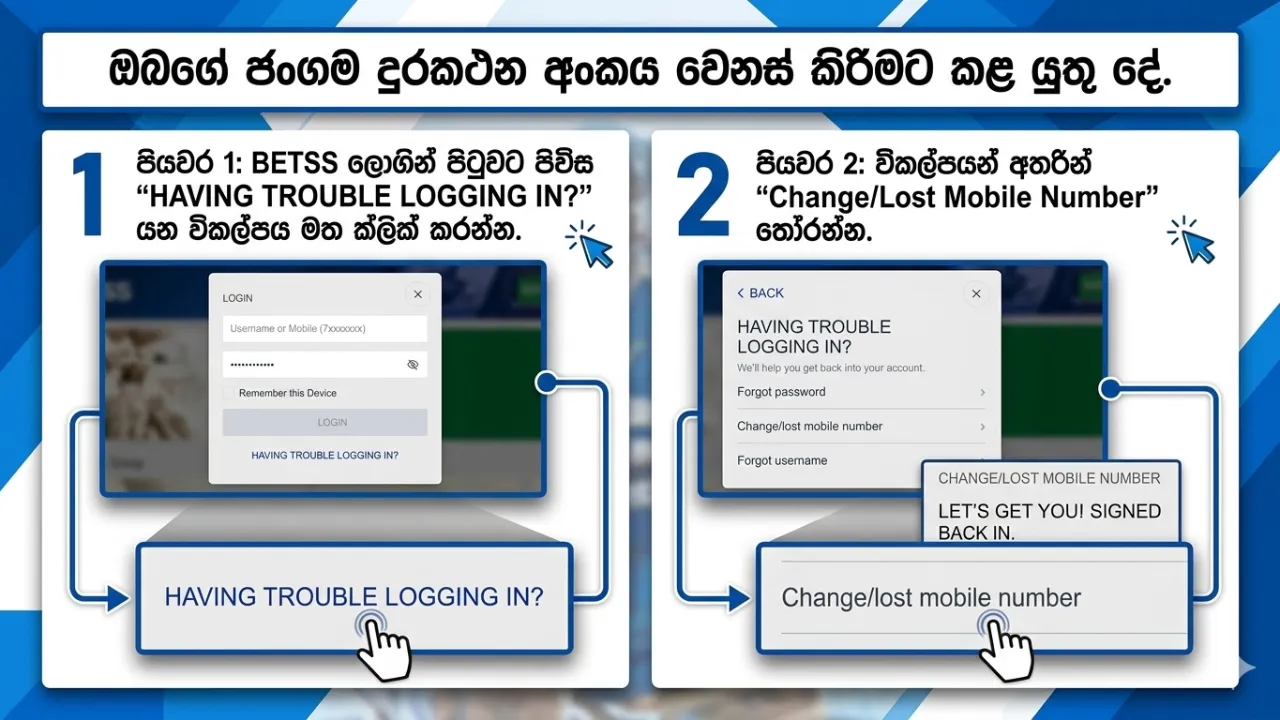
ඔබගේ ජංගම දුරකථන අංකය වෙනස් කිරීමට හෝ එයට ප්‍රවේශය අහිමි වූ විට කළ යුතු දේ ඔබගේ ලියාපදිංචි ජංගම දුරකථන අංකයට ප්‍රවේශය නොමැති නම් හෝ නව අංකයක් යාවත්කාලීන කිරීමට අවශ්‍ය නම්, BETSS ඔබගේ ලියාපදිංචි විද්‍යුත් තැපැල් (Email) ලිපිනය හරහා ආරක්ෂිත ප්‍රතිසාධන (Recovery) ක්‍රමයක් ලබාදෙයි. පියවරෙන් පියවර මාර්ගෝපදේශය පියවර 1: BETSS ලොගින් පිටුවට පිවිස “HAVING TROUBLE LOGGING IN?” යන විකල්පය මත ක්ලික් කරන්න. පියවර 2: විකල්පයන් අතරින් “Change/Lost Mobile Number” තෝරන්න. පියවර 3: ඔබගේ BETSS ගිණුමට සම්බන්ධ කර ඇති විද්‍යුත් තැපැල් ලිපිනය ඇතුළත් කරන්න. පියවර 4: ඔබගේ ලියාපදිංචි Email ලිපිනයට OTP සත්‍යාපන කේතයක් (Verification Code) එවනු ලබයි. පියවර 5: එම OTP කේතය ඇතුළත් කර ලබාදෙන උපදෙස් අනුගමනය කර ඔබගේ නව ජංගම දුරකථන අංකය යාවත්කාලීන කරන්න. වැදගත් සටහන් මෙම ක්‍රියාවලිය භාවිතා කිරීමට ඔබගේ BETSS ගිණුමට ලියාපදිංචි Email ලිපිනයක් තිබිය යුතුය. ඔබ Email එකක් එකතු කර නොමැති නම්, ඔබගේ ගිණුමට ලොගින් වී My Account වෙත ගොස් Email එකක් එකතු කරන්න. සෑම විටම ආරක්ෂිත සහ ඔබට ප්‍රවේශය ඇති Email ලිපිනයක් භාවිතා කරන්න. අවසාන සටහන සාර්ථක සත්‍යාපනයෙන් පසු, ඔබගේ නව ජංගම දුරකථන අංකය ඔබගේ BETSS ගිණුමට ආරක්ෂිතව යාවත්කාලීන කරනු ලබයි.
සිංහල

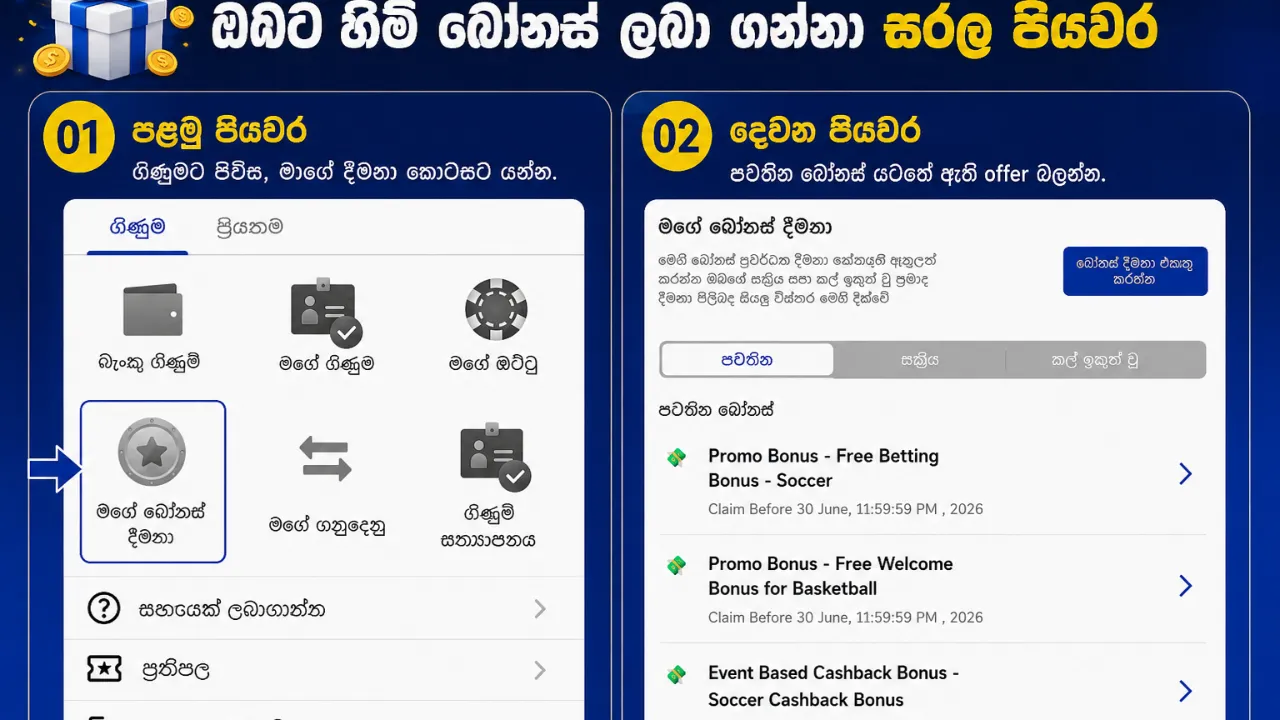
ඔබට හිමි බෝනස් ලබා ගන්නා සරල පියවර

බෝනස් ලබාගන්නා ආකාරය ඔබේ බෝනස් එක ලබාගැනීමට පහත පියවර අනුගමනය කරන්න: ඔබේ BetSS ගිණුමට ලොගින් වී profile icon මත Click කරන්න My Bonus කොටසට යන්න Available Bonuses යටතේ ඇති offer බලන්න ඔබට අවශ්‍ය බෝනස් එක තෝරන්න “Claim / Activate” මත ක්ලික් කරන්න ⚡ බෝනස් සක්‍රීය කිරීමේ අවශ්‍යතා සමහර බෝනස් සක්‍රීය කිරීමට පහත දේවල් අවශ්‍ය විය හැක: Promo Code එකක් ඇතුල් කිරීම, හෝ Deposit (මුදල් තැන්පත් කිරීමක්) කිරීම 📌 වැදගත් බෝනස් ලබාගැනීමට පෙර ඔබ KYC Verification සම්පූර්ණ කළ යුතුය ✅ බෝනස් ලබාගත් පසු ඔබ බෝනස් එක සාර්ථකව ලබාගත් පසු එය Active Bonuses යටතේ දිස්වනු ඇත  

Platform Guides
English

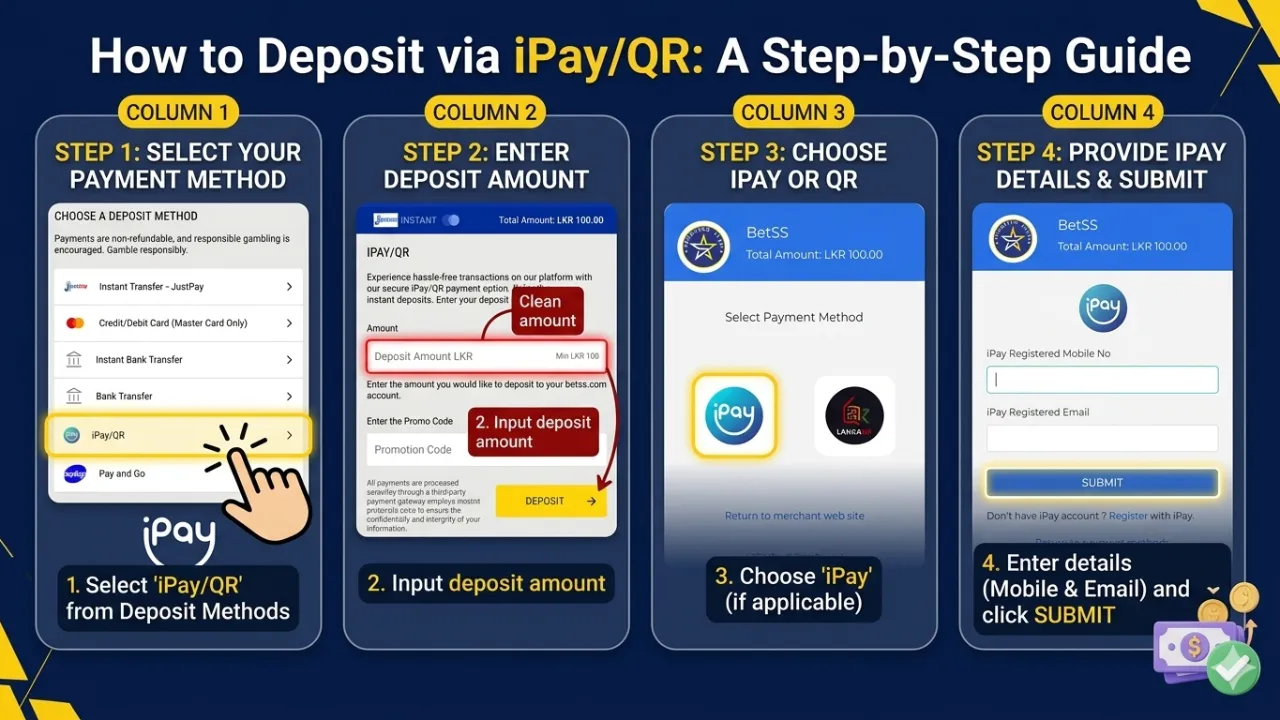
How to Deposit via iPay/QR: A Step-by-Step Guide

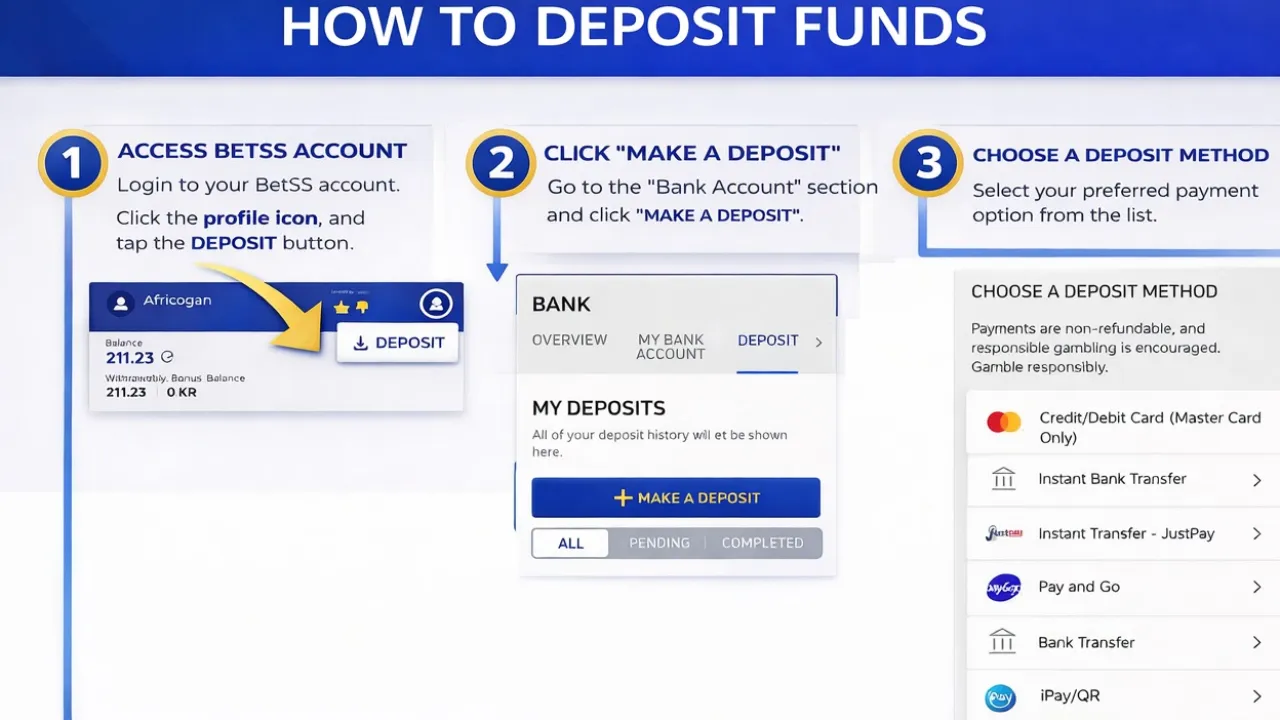
Depositing funds using iPay/QR is a fast and secure way to top up your account. Follow these steps to complete your transaction: Step 1: Access the Deposit Section Log in to your account and click the Deposit button. From the list of available payment options, select iPay/QR. Step 2: Enter Deposit Amount Input the amount you wish to deposit into your account. Minimum Deposit: LKR 100. Step 3: Apply Promo Code (Optional) If you have a promotional code, enter it in the designated field to unlock special bonuses and exclusive offers. Choose iPay or QR Once redirected to the payment gateway, select the iPay option or the LankaQR option. Step 4: Provide iPay Details Once you proceed, you will be directed to the secure iPay gateway. You must provide: Your iPay registered mobile number. Your iPay registered email address. Click Submit to move forward. Step 5: Complete the Payment After a successful payment, your funds will be credited to your account balance instantly. ⚡ Essential Tips for a Successful Deposit Verify Amount: Double-check that the entered amount is correct before proceeding to the payment gateway. Maintain Connection: Do not refresh your browser or close the payment page while the transaction is processing. Confirmation: Ensure you receive a "Success" message from iPay to guarantee the funds have been sent. 🔐 Secure Transactions Your safety is a priority. All iPay/QR transactions are protected with advanced encryption to ensure a smooth and hassle-free experience.  

Platform Guides
English

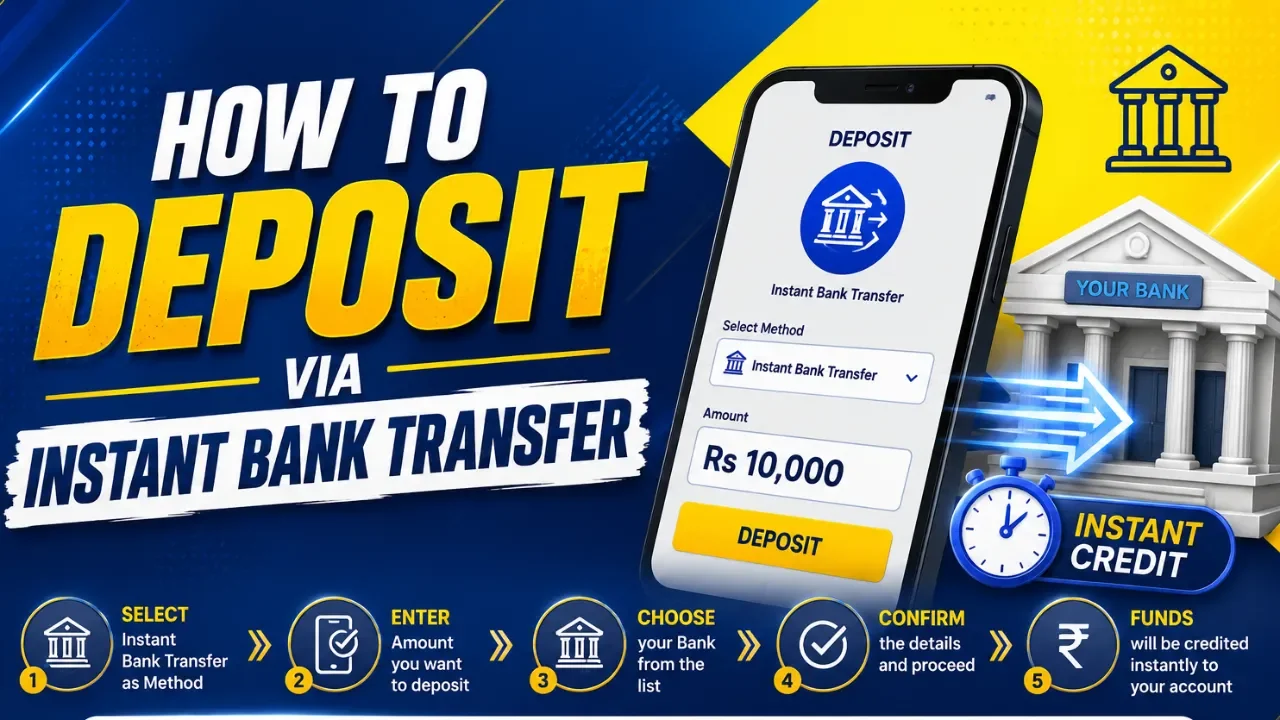
How to Deposit via Instant Bank Transfer: A Step-by-Step Guide

Depositing funds to your account is fast, secure, and straightforward using the Instant Bank Transfer method. Follow these steps to complete your transaction: Step 1: Access the Deposit Section Log in to your account and navigate to the Deposit button, typically located in the top navigation bar or within your account dashboard. Step 2: Select Payment Method Choose Instant Bank Transfer from the list of available payment options to initiate the process. Step 3: Enter Deposit Amount Input the specific amount you wish to transfer. Note: Transactions must be between a minimum of LKR 100 and a maximum of LKR 50,000. Step 4: Apply Promo Code (Optional) If you have a promotional code, enter it in the designated field to unlock any applicable bonuses or rewards. Step 5: Initiate the Request Review your entered amount and click the Deposit button to move to the secure verification page. Step 6: Provide Personal Information Enter your required details accurately to verify the transaction: Full Name (as it appears on your bank account) NIC or Passport Number Mobile Number Email Address Once completed, click Next and follow the on-screen instructions provided by your banking gateway to finalize the transfer. ⚡ Essential Tips for a Successful Deposit Bank Compatibility: Ensure your bank account is enabled for instant online transfers. OTP Security: Keep your mobile device ready. Enter the One-Time Password (OTP) immediately to prevent the session from timing out. Instant Crediting: Funds are typically credited to your account balance the moment the verification is successful. 🔐 Security Guaranteed Your financial safety is our priority. All transactions are processed through high-level encrypted payment gateways to ensure your data and funds remain protected. Start your seamless experience today!

Platform Guides
English

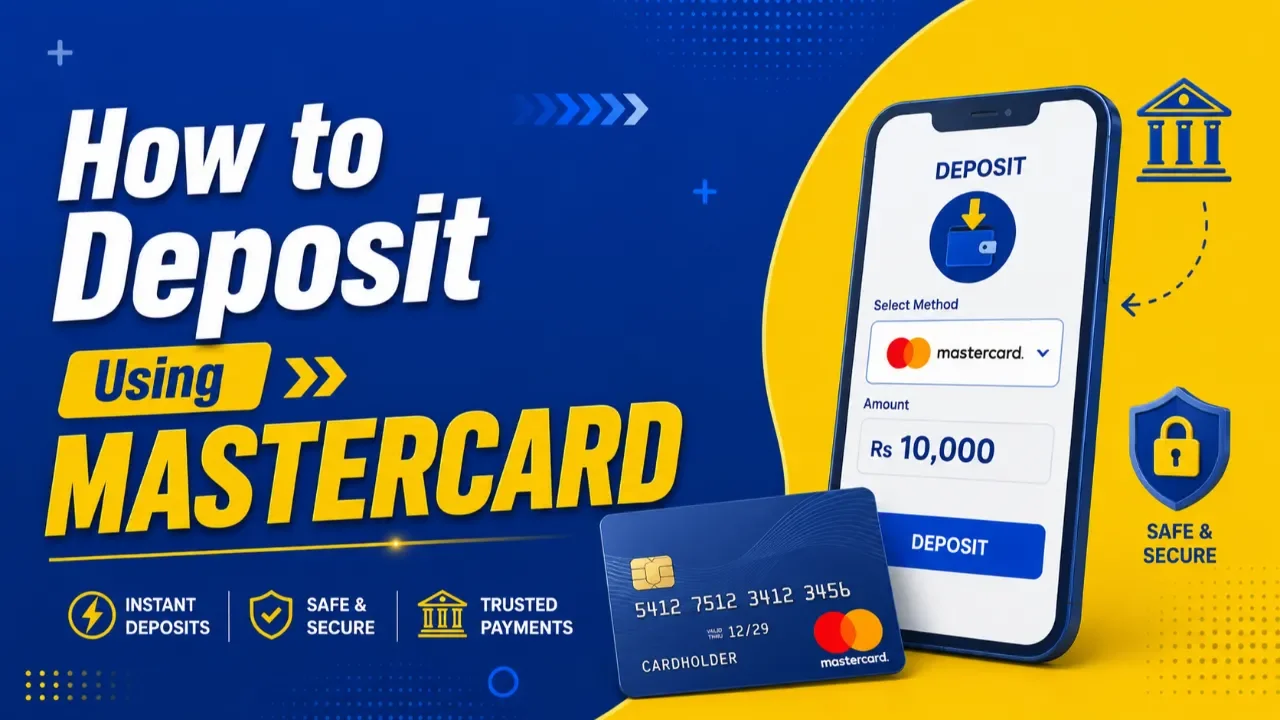
How to Deposit Using MASTERCARD – A Step-by-Step Guide

 HOW TO DEPOSIT USING MASTERCARD – STEP-BY-STEP GUIDE Making a deposit with your MasterCard is fast, secure, and easy. Follow the instructions below to complete your deposit successfully. 🔹 STEP 1 – LOG IN → Profile Icon → Deposit Sign in to your account using your registered username/phone number and password. Once logged in, click the Profile Icon. Click Deposit. Tap the Make A Deposit button.  🔹 STEP 2 – SELECT PAYMENT METHOD Choose: MasterCard (This option allows you to make instant deposits directly using your MasterCard.) 🔹 STEP 3 – ENTER DEPOSIT AMOUNT Type the amount you wish to deposit into your account. ⚠ Minimum Deposit: LKR 100 🔹 STEP 4 – ADD PROMO CODE (OPTIONAL) Enter a promo code only if you have a valid deposit bonus promo code. Leave it blank if you do not have a deposit bonus promo code.  🔹 STEP 5 – CLICK DEPOSIT After confirming your amount and promo code, click the DEPOSIT button to proceed to the secure payment gateway. 🔹 STEP 6 – ENTER CARD DETAILS Fill in your MasterCard information correctly: ✔ Cardholder Name ✔ Card Number ✔ Expiry Month & Year ✔ Security Code (CVV) ✔ Billing Address (Optional) (Leave it blank if you do not wish to provide your billing address information.) ⚠ Make sure all details match your bank card information. 🔹 STEP 7 – COMPLETE PAYMENT Click PAY to confirm the transaction. You will receive an OTP from your bank. Once you confirm the OTP, the payment will be credited to your BetSS account. ━━━━━━━━━━━━━━━ ⚡ IMPORTANT NOTES ✅ Ensure your MasterCard is enabled for online transactions ✅ Double-check card details before submitting ✅ Keep sufficient balance in your bank account ✅ Transactions are processed securely through encrypted payment gateways ✅ Processing is usually instant depending on bank availability   ⚠ BANK RESTRICTION NOTICE For some banks such as Commercial Bank, HNB, and Sampath Bank, MasterCard deposits may not work due to bank-side transaction restrictions. 👉 In such cases, please use the JustPay deposit method for a smoother and more successful transaction experience. 🔐 SAFE & SECURE PAYMENTS All payments are protected with trusted SSL encrypted payment systems for maximum security. 🚀 Deposit now and enjoy a smooth gaming experience!

Videos

Featured content curated by our editors.

Platform Guides
English
play_arrow

Cashout Feature “ How It Works"

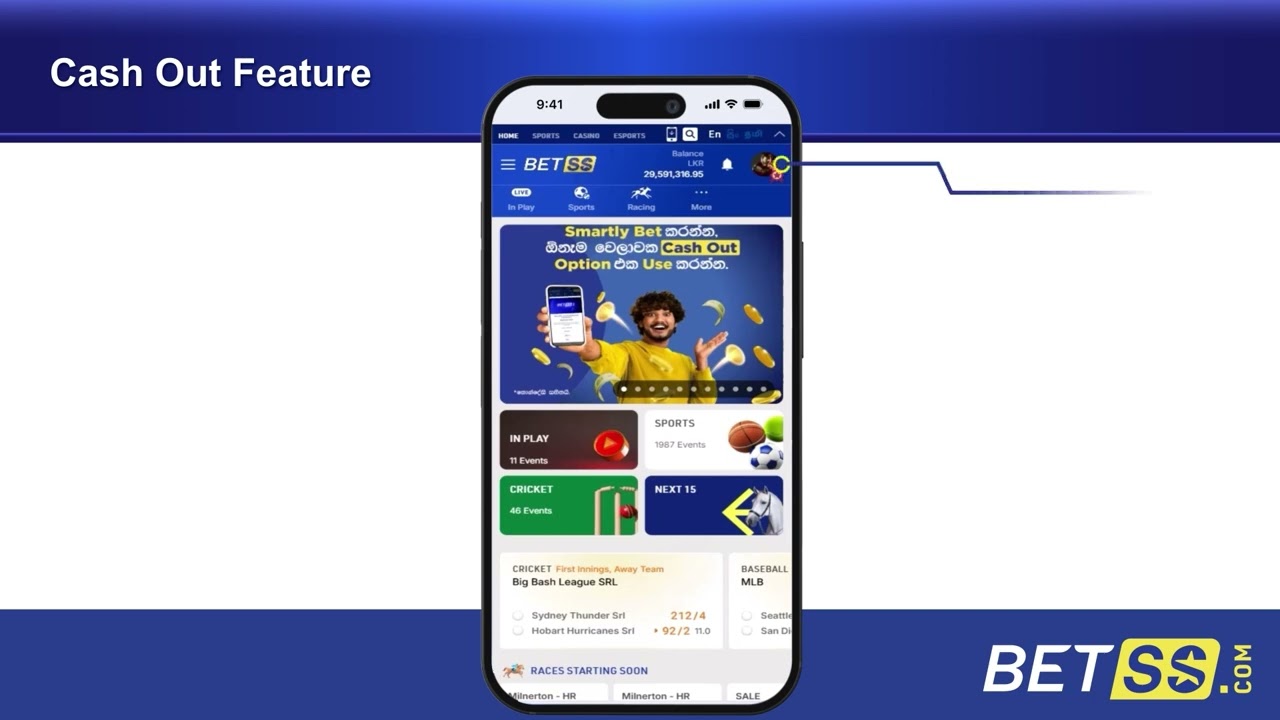
Cashout allows you to settle your bet before the event is completed. It gives you full control to secure your winnings or reduce your loss at any time during eligible matches.   What is Cashout? Cashout is a feature that lets you close your active bet early. Depending on the match situation, you can either: Take a guaranteed profit before the match ends Minimize potential losses by settling early The cashout value is updated in real-time based on match progress.   Cashout feature is only available for Sports excluding Cricket.   When is Cashout Available? Cashout is available only for selected: Pre-match bets Live/in-play matches Availability depends on: Match status Market type Odds movement If the “Cashout” button is visible, your bet is eligible.   How to Use Cashout Follow these simple steps: Go to My Bets Select the active bet you want to cash out Click the Cashout button Review the offered amount Confirm to complete the cashout Once confirmed, the bet will be settled immediately.   Important Points to Remember The Cashout feature is currently available only for Sports (excluding Cricket). Cashout value changes in real time based on match situation The offer may be higher or lower than your original stake outcome Once you cash out, the bet cannot be reversed Some bets may not be eligible for cashout    Why Use Cashout? Secure winnings early Reduce risk during uncertain matches Stay in control of your betting strategy   Learn More Watch the video above to see a step-by-step guide on how to use the Cashout feature on Betss.com and manage your bets more effectively.

article
check_circle