How to Claim Your Bonus on BetSS
calendar_today
Apr 28, 2026
visibility
2,209 Views
language
English
🎁 How to Claim Your Bonus
Follow these simple steps to claim your bonus:
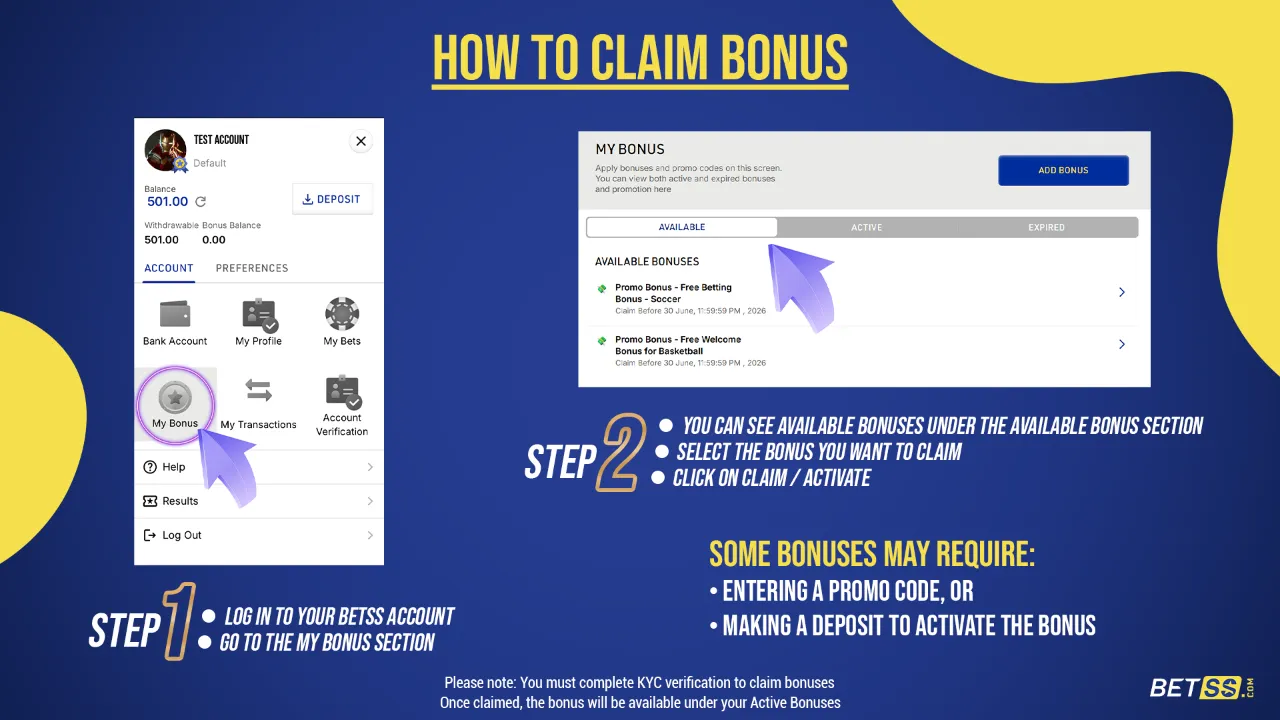
- Log in to your BetSS account and tap the Profile icon
- Go to the My Bonus section
- Check available offers under Available Bonuses
- Select the bonus you wish to claim
- Read Terms & Conditions and Click “Claim / Activate”
⚡ Bonus Activation Requirements
Some bonuses may require:
- Entering a promo code, or
- Making a deposit to activate the bonus
📌 Important
- You must complete KYC Verification before claiming any bonus
✅ After Claiming
- Once successfully claimed, your bonus will appear under Active Bonuses