How to Deposit Using JustPay (Guide)
JustPay is a fast and convenient way to make bank payments. However, transactions may fail if certain requirements are not met.
Before Adding Your Bank to JustPay
Before linking your bank account, make sure the following are in place in your bank account:
JustPay Service Activated
- Your bank account must support JustPay
- For some accounts (especially current accounts), this is not enabled by default
- You may need to request activation from your bank
If unsure, contact your bank and confirm JustPay availability.
SMS Alerts Enabled
- OTP (One-Time Password) is required for authentication
- If SMS alerts are disabled, you may:
- Not receive OTP
- Face transaction failures
If not activated, contact your bank and enable sms alert to your bank account.
Sufficient Balance
- Even for linking/verification, some banks may require balance
- For transactions, low balance = immediate failure
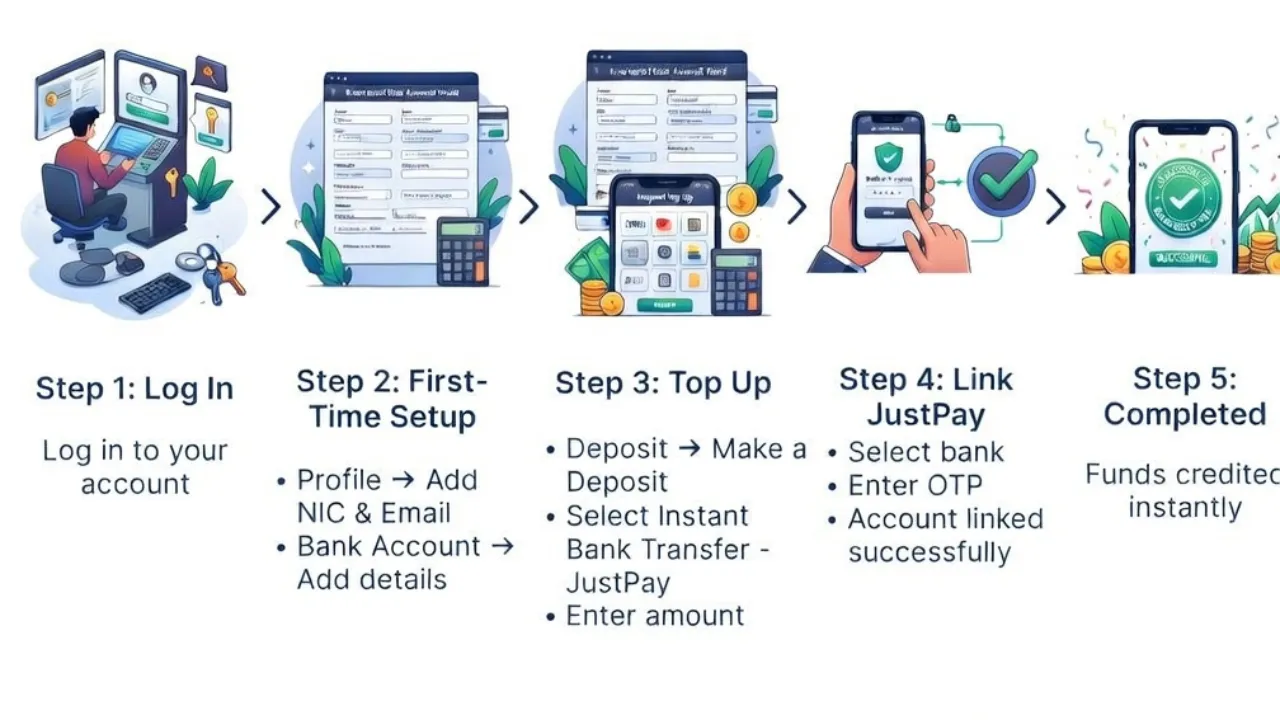
Follow these simple steps to make your deposit instantly:
Step 1: Log in
Log in to your BetSS account.
Go to Deposit † Make a Deposit
Select JustPay as your payment method.
Step 2: Complete First-Time Setup
(Only required for new users)
Go to My Profile and complete the following:
- Add your NIC and Email Address (mandatory)
Go to Bank Account:
- Add your Bank Account Details
Important:
When entering your Name and Branch Name, do NOT leave spaces at the end of the name.
Step 3: Create JustPay Profile & Link Your Bank Account
- Go to Deposit → Make a Deposit
- Select JustPay as your payment method
- Enter your deposit amount
- Click Confirm Payment
- Select the bank account you already added
- You will receive an OTP from your bank to your registered mobile number
- Enter the OTP to confirm
- Your JustPay profile will be created and linked to your bank account
- Proceed to complete the payment
- Your deposit will be credited instantly to your BetSS account
Other reasons for Justpay Transaction Failures
Technical & System-Related Issues
Even if your account is properly set up, technical issues can still cause failures:
Wrong PIN / OTP Issues
- Incorrect PIN entered
- OTP entered late (expired)
- OTP not received due to network issues
Always enter OTP quickly and ensure signal is stable.
Bank Server Downtime
- Your bank system may be:
- Under maintenance
- Temporarily unavailable
Try again after some time.
Network / App Issues
- Poor internet connection
- App freezing or timeout
- Device-related glitches
Use a stable connection and retry.
Transaction Limits
- JustPay has limits per transaction and daily usage
- Exceeding limits will result in rejection
Always check your allowed limits before retrying.
If everything above is correct, these could be the cause:
Bank Declined Transaction
Your bank may block the transaction due to:
- Security checks (unusual activity)
- Temporary account restrictions
- Internal risk controls
Contact your bank for clarification.
Transaction Limit (Important)
- Maximum per transaction: 150,000 LKR
- Some banks (like BOC, People's Bank) may have lower custom limits
Always confirm your limit directly with your bank.
Still Facing Issues?
Your bank is the best point of contact to verify:
- JustPay activation status
- Account eligibility
- Transaction limits
- Any restrictions or blocks