Tag: #deposit

Step-by-step instructional modules for every platform feature.

Platform Guides
English

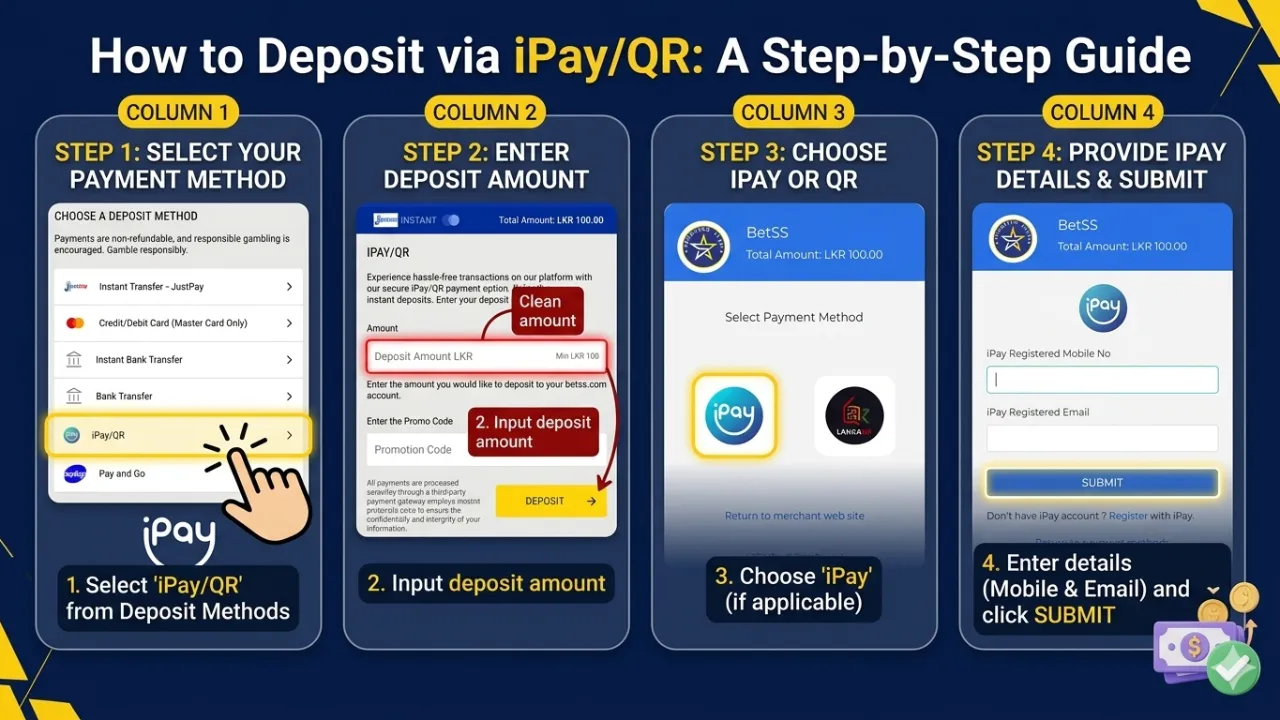
How to Deposit via iPay/QR: A Step-by-Step Guide

Depositing funds using iPay/QR is a fast and secure way to top up your account. Follow these steps to complete your transaction: Step 1: Access the Deposit Section Log in to your account and click the Deposit button. From the list of available payment options, select iPay/QR. Step 2: Enter Deposit Amount Input the amount you wish to deposit into your account. Minimum Deposit: LKR 100. Step 3: Apply Promo Code (Optional) If you have a promotional code, enter it in the designated field to unlock special bonuses and exclusive offers. Choose iPay or QR Once redirected to the payment gateway, select the iPay option or the LankaQR option. Step 4: Provide iPay Details Once you proceed, you will be directed to the secure iPay gateway. You must provide: Your iPay registered mobile number. Your iPay registered email address. Click Submit to move forward. Step 5: Complete the Payment After a successful payment, your funds will be credited to your account balance instantly. ⚡ Essential Tips for a Successful Deposit Verify Amount: Double-check that the entered amount is correct before proceeding to the payment gateway. Maintain Connection: Do not refresh your browser or close the payment page while the transaction is processing. Confirmation: Ensure you receive a "Success" message from iPay to guarantee the funds have been sent. 🔐 Secure Transactions Your safety is a priority. All iPay/QR transactions are protected with advanced encryption to ensure a smooth and hassle-free experience.  
Platform Guides
English

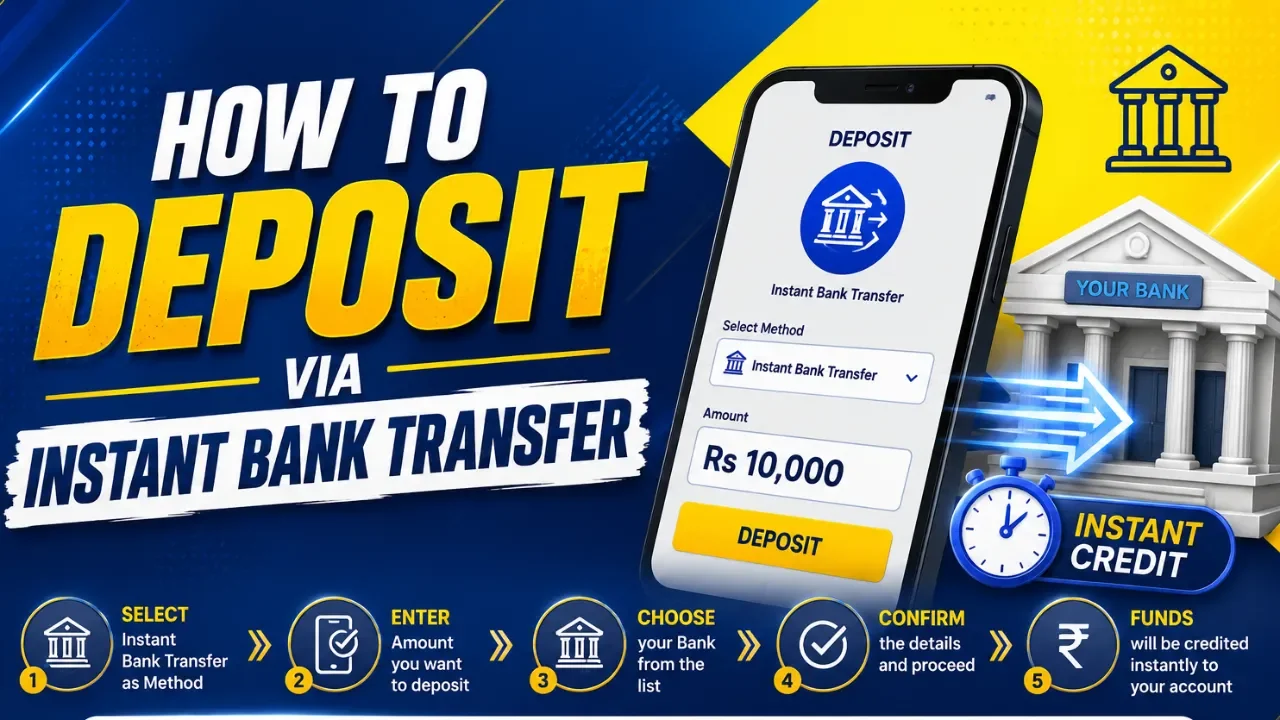
How to Deposit via Instant Bank Transfer: A Step-by-Step Guide

Depositing funds to your account is fast, secure, and straightforward using the Instant Bank Transfer method. Follow these steps to complete your transaction: Step 1: Access the Deposit Section Log in to your account and navigate to the Deposit button, typically located in the top navigation bar or within your account dashboard. Step 2: Select Payment Method Choose Instant Bank Transfer from the list of available payment options to initiate the process. Step 3: Enter Deposit Amount Input the specific amount you wish to transfer. Note: Transactions must be between a minimum of LKR 100 and a maximum of LKR 50,000. Step 4: Apply Promo Code (Optional) If you have a promotional code, enter it in the designated field to unlock any applicable bonuses or rewards. Step 5: Initiate the Request Review your entered amount and click the Deposit button to move to the secure verification page. Step 6: Provide Personal Information Enter your required details accurately to verify the transaction: Full Name (as it appears on your bank account) NIC or Passport Number Mobile Number Email Address Once completed, click Next and follow the on-screen instructions provided by your banking gateway to finalize the transfer. ⚡ Essential Tips for a Successful Deposit Bank Compatibility: Ensure your bank account is enabled for instant online transfers. OTP Security: Keep your mobile device ready. Enter the One-Time Password (OTP) immediately to prevent the session from timing out. Instant Crediting: Funds are typically credited to your account balance the moment the verification is successful. 🔐 Security Guaranteed Your financial safety is our priority. All transactions are processed through high-level encrypted payment gateways to ensure your data and funds remain protected. Start your seamless experience today!

Platform Guides
English

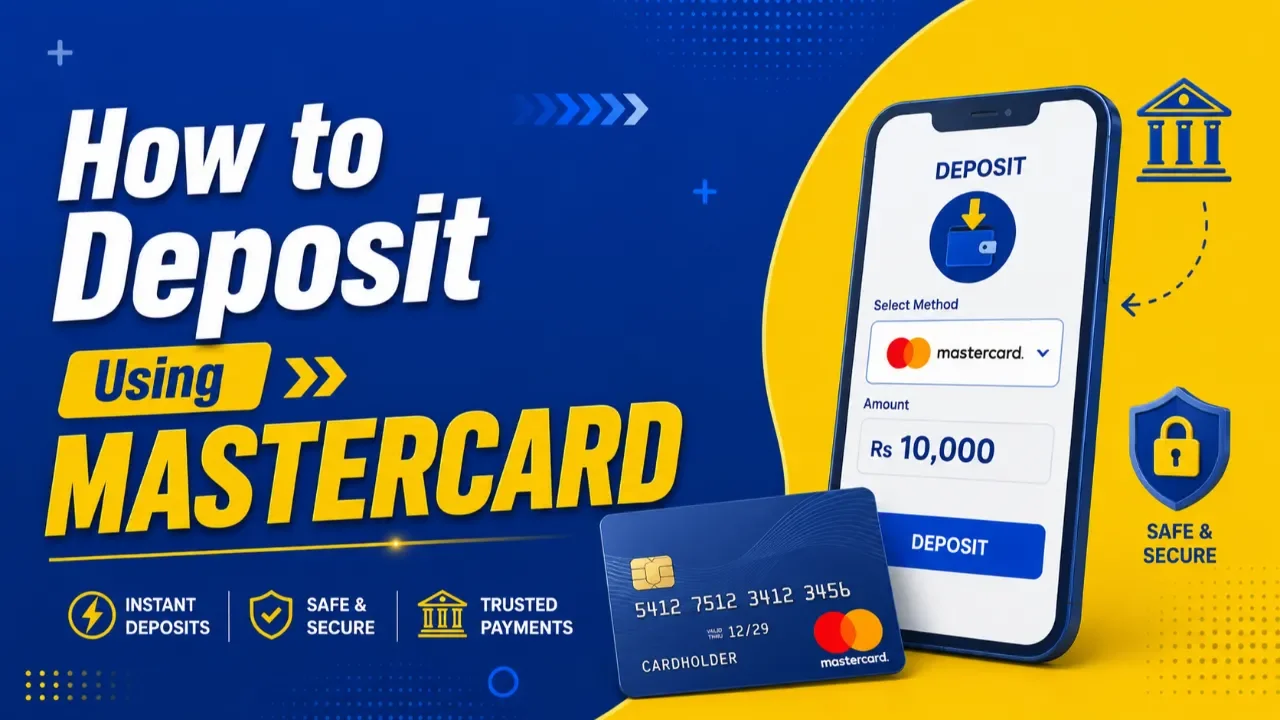
How to Deposit Using MASTERCARD – A Step-by-Step Guide

 HOW TO DEPOSIT USING MASTERCARD – STEP-BY-STEP GUIDE Making a deposit with your MasterCard is fast, secure, and easy. Follow the instructions below to complete your deposit successfully. 🔹 STEP 1 – LOG IN → Profile Icon → Deposit Sign in to your account using your registered username/phone number and password. Once logged in, click the Profile Icon. Click Deposit. Tap the Make A Deposit button.  🔹 STEP 2 – SELECT PAYMENT METHOD Choose: MasterCard (This option allows you to make instant deposits directly using your MasterCard.) 🔹 STEP 3 – ENTER DEPOSIT AMOUNT Type the amount you wish to deposit into your account. ⚠ Minimum Deposit: LKR 100 🔹 STEP 4 – ADD PROMO CODE (OPTIONAL) Enter a promo code only if you have a valid deposit bonus promo code. Leave it blank if you do not have a deposit bonus promo code.  🔹 STEP 5 – CLICK DEPOSIT After confirming your amount and promo code, click the DEPOSIT button to proceed to the secure payment gateway. 🔹 STEP 6 – ENTER CARD DETAILS Fill in your MasterCard information correctly: ✔ Cardholder Name ✔ Card Number ✔ Expiry Month & Year ✔ Security Code (CVV) ✔ Billing Address (Optional) (Leave it blank if you do not wish to provide your billing address information.) ⚠ Make sure all details match your bank card information. 🔹 STEP 7 – COMPLETE PAYMENT Click PAY to confirm the transaction. You will receive an OTP from your bank. Once you confirm the OTP, the payment will be credited to your BetSS account. ━━━━━━━━━━━━━━━ ⚡ IMPORTANT NOTES ✅ Ensure your MasterCard is enabled for online transactions ✅ Double-check card details before submitting ✅ Keep sufficient balance in your bank account ✅ Transactions are processed securely through encrypted payment gateways ✅ Processing is usually instant depending on bank availability   ⚠ BANK RESTRICTION NOTICE For some banks such as Commercial Bank, HNB, and Sampath Bank, MasterCard deposits may not work due to bank-side transaction restrictions. 👉 In such cases, please use the JustPay deposit method for a smoother and more successful transaction experience. 🔐 SAFE & SECURE PAYMENTS All payments are protected with trusted SSL encrypted payment systems for maximum security. 🚀 Deposit now and enjoy a smooth gaming experience!

Platform Guides
English

Why JustPay & Instant Transfer Fail

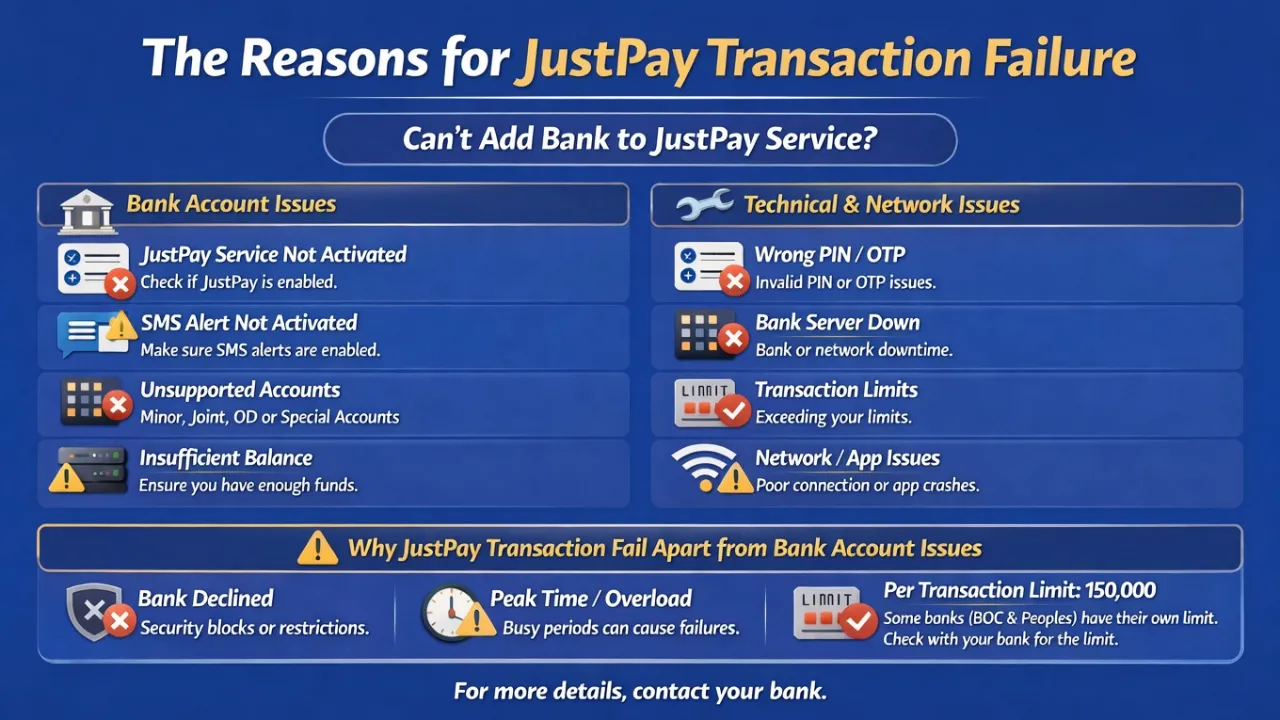
💳 How These Payment Methods Work   Both Instant Transfer (JustPay) and Instant Bank Transfer operate through the same JustPay banking infrastructure. This means: Both methods rely on your bank’s JustPay activation OTP verification is required for every transaction Transactions depend on your bank’s system availability 👉 JustPay is a fast and convenient payment method, but transactions may fail if certain requirements are not met. ⚠️ Common Reasons for Transaction Failure 1. JustPay Not Activated Your bank account must have JustPay service enabled Some account types are not activated by default 👉 Solution: Contact your bank to activate JustPay 2. SMS Alerts / OTP Not Enabled OTP is required for transaction verification If SMS alerts are disabled: OTP will not be received Transaction will fail 👉 Solution: Enable SMS alerts through your bank 3. Insufficient Balance Some banks require a minimum balance for transaction approval 👉 Solution: Ensure your account has sufficient funds 4. OTP / Authentication Issues Incorrect OTP entered OTP expired due to delay OTP not received due to network issues 👉 Solution: Enter OTP quickly and ensure a stable network connection 5. Bank System Downtime Bank servers may be under maintenance Temporary service interruptions may occur 👉 Solution: Wait a few minutes and try again 6. Network / Device Issues Poor internet connection App timeout or freezing 👉 Solution: Use a stable internet connection and retry 7. Transaction Limit Exceeded Maximum per transaction: LKR 150,000 Some banks may have lower limits 👉 Solution: Check your bank’s transaction limits before retrying 8. Bank Security Rejection Transactions may be blocked due to security checks Account restrictions or risk controls may apply 👉 Solution: Contact your bank for further clarification 📌 Important Note If all details are correct but the issue still persists, please contact your bank to confirm: JustPay activation status Account eligibility Transaction limits Any restrictions or blocks 📞 Still Facing Issues? 👉 Your bank is the best point of contact to verify and resolve any payment-related issues.

Platform Guides
English

Fast & Easy Deposits on Betss

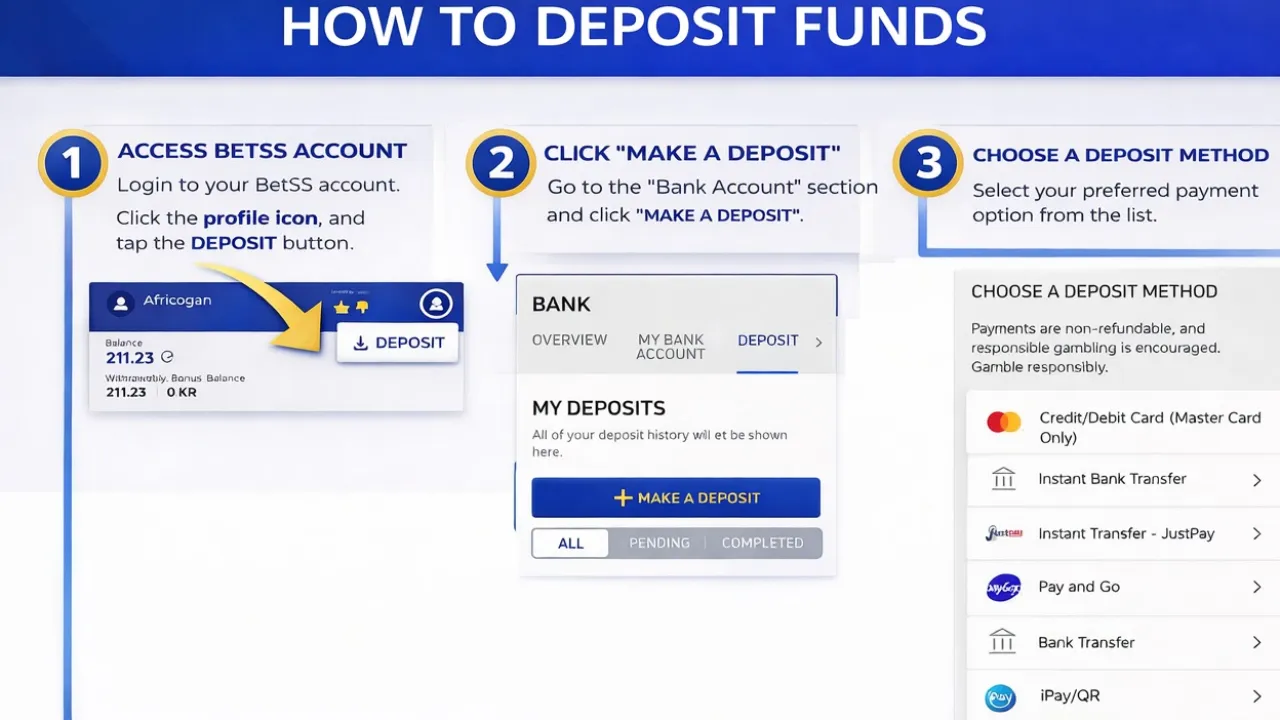
Follow these easy steps to add funds to your account: Log in to your BetSS account. Go to profile page. Click "Deposit". Tap "Make A Deposit" button  Choose your preferred payment method,  Enter the amount Press "Deposit" button.  Your account will be topped up instantly once the payment is successful. Minimum Deposit: 100 LKR Available Payment Methods Instant Payment Methods (Recommended for faster deposit) Instant Transfer“ JustPay Mastercard Payments Instant Bank Transfer iPay / QR Payments Fund Transfer via 3rd party Banking App Bank Transfer (This will take 15-30 minutes for manual review & approval process). You can also top up through Pay & Go machines & Mobile App.

Platform Guides
English

How to Deposit Using JustPay (Guide)

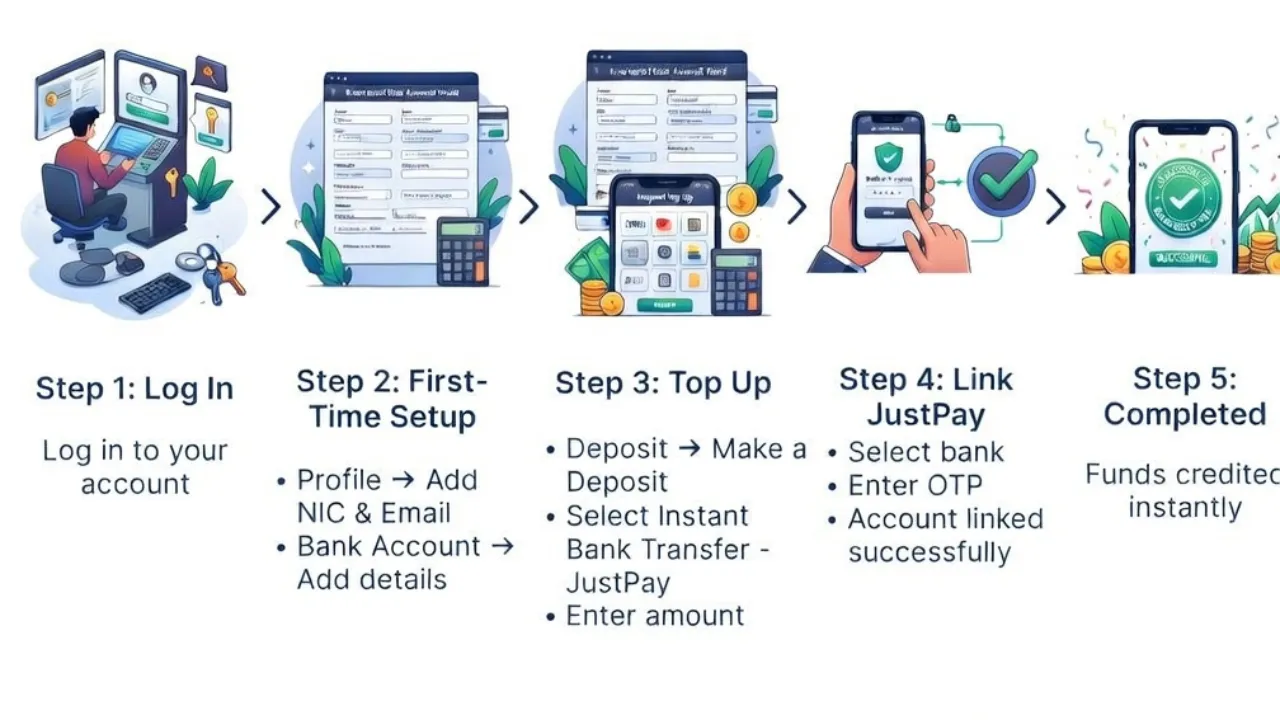
JustPay is a fast and convenient way to make bank payments. However, transactions may fail if certain requirements are not met.   Before Adding Your Bank to JustPay Before linking your bank account, make sure the following are in place in your bank account: JustPay Service Activated Your bank account must support JustPay For some accounts (especially current accounts), this is not enabled by default You may need to request activation from your bank If unsure, contact your bank and confirm JustPay availability. SMS Alerts Enabled OTP (One-Time Password) is required for authentication If SMS alerts are disabled, you may: Not receive OTP Face transaction failures If not activated, contact your bank and enable sms alert to your bank account. Sufficient Balance Even for linking/verification, some banks may require balance For transactions, low balance = immediate failure Follow these simple steps to make your deposit instantly: Step 1: Log in Log in to your BetSS account. Go to Deposit † Make a Deposit Select JustPay as your payment method. Step 2: Complete First-Time Setup (Only required for new users) Go to My Profile and complete the following: Add your NIC and Email Address (mandatory) Go to Bank Account: Add your Bank Account Details Important: When entering your Name and Branch Name, do NOT leave spaces at the end of the name. Step 3: Create JustPay Profile & Link Your Bank Account Go to Deposit → Make a Deposit Select JustPay as your payment method Enter your deposit amount Click Confirm Payment Select the bank account you already added You will receive an OTP from your bank to your registered mobile number Enter the OTP to confirm Your JustPay profile will be created and linked to your bank account Proceed to complete the payment Your deposit will be credited instantly to your BetSS account Other reasons for Justpay Transaction Failures Technical & System-Related Issues Even if your account is properly set up, technical issues can still cause failures: Wrong PIN / OTP Issues Incorrect PIN entered OTP entered late (expired) OTP not received due to network issues Always enter OTP quickly and ensure signal is stable. Bank Server Downtime Your bank system may be: Under maintenance Temporarily unavailable Try again after some time. Network / App Issues Poor internet connection App freezing or timeout Device-related glitches Use a stable connection and retry. Transaction Limits JustPay has limits per transaction and daily usage Exceeding limits will result in rejection Always check your allowed limits before retrying. If everything above is correct, these could be the cause: Bank Declined Transaction Your bank may block the transaction due to: Security checks (unusual activity) Temporary account restrictions Internal risk controls Contact your bank for clarification. Transaction Limit (Important) Maximum per transaction: 150,000 LKR Some banks (like BOC, People's Bank) may have lower custom limits Always confirm your limit directly with your bank. Still Facing Issues? Your bank is the best point of contact to verify: JustPay activation status Account eligibility Transaction limits Any restrictions or blocks   

check_circle