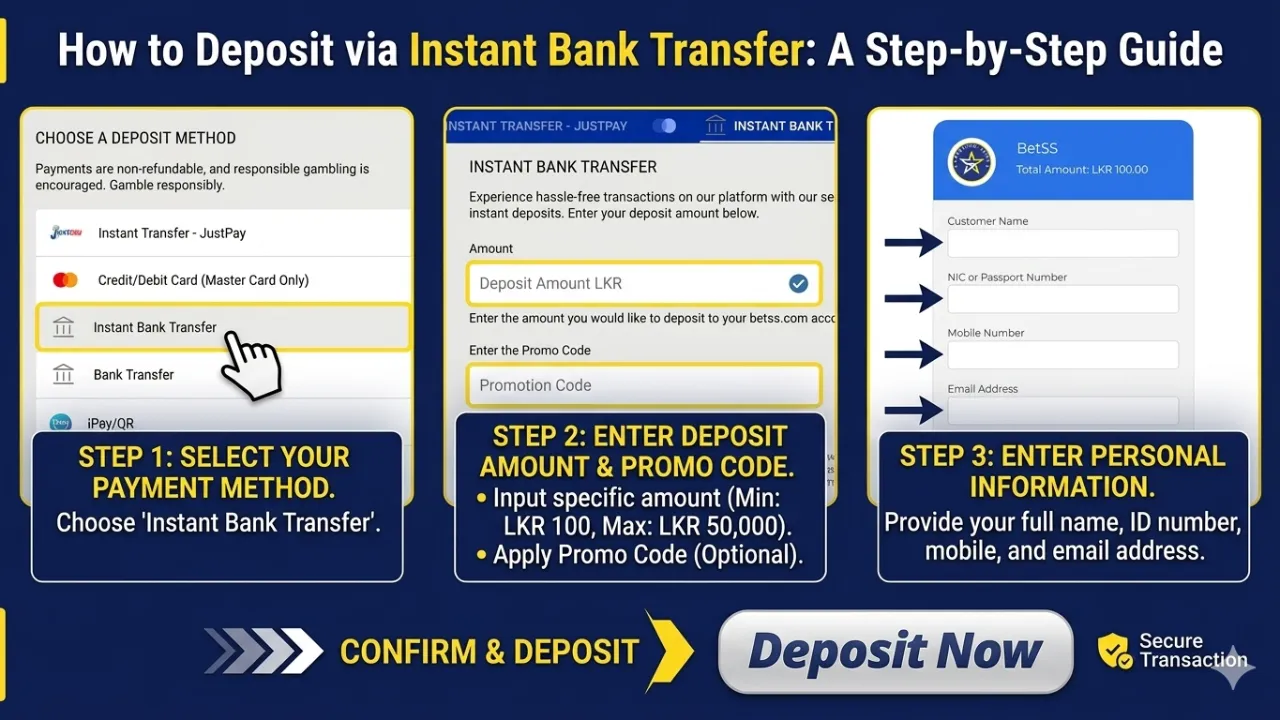
How to Deposit via Instant Bank Transfer: A Step-by-Step Guide

Depositing funds to your account is fast, secure, and straightforward using the Instant Bank Transfer method. Follow these steps to complete your transaction:
Step 1: Access the Deposit Section
Log in to your account and navigate to the Deposit button, typically located in the top navigation bar or within your account dashboard.
Step 2: Select Payment Method
Choose Instant Bank Transfer from the list of available payment options to initiate the process.
Step 3: Enter Deposit Amount
Input the specific amount you wish to transfer.
Note: Transactions must be between a minimum of LKR 100 and a maximum of LKR 50,000.
Step 4: Apply Promo Code (Optional)
If you have a promotional code, enter it in the designated field to unlock any applicable bonuses or rewards.
Step 5: Initiate the Request
Review your entered amount and click the Deposit button to move to the secure verification page.
Step 6: Provide Personal Information
Enter your required details accurately to verify the transaction:
- Full Name (as it appears on your bank account)
- NIC or Passport Number
- Mobile Number
- Email Address
Once completed, click Next and follow the on-screen instructions provided by your banking gateway to finalize the transfer.
⚡ Essential Tips for a Successful Deposit
- Bank Compatibility: Ensure your bank account is enabled for instant online transfers.
- OTP Security: Keep your mobile device ready. Enter the One-Time Password (OTP) immediately to prevent the session from timing out.
- Instant Crediting: Funds are typically credited to your account balance the moment the verification is successful.
🔐 Security Guaranteed
Your financial safety is our priority. All transactions are processed through high-level encrypted payment gateways to ensure your data and funds remain protected.
Start your seamless experience today!