How to Deposit via iPay/QR: A Step-by-Step Guide
calendar_today
May 23, 2026
visibility
444 Views
language
English
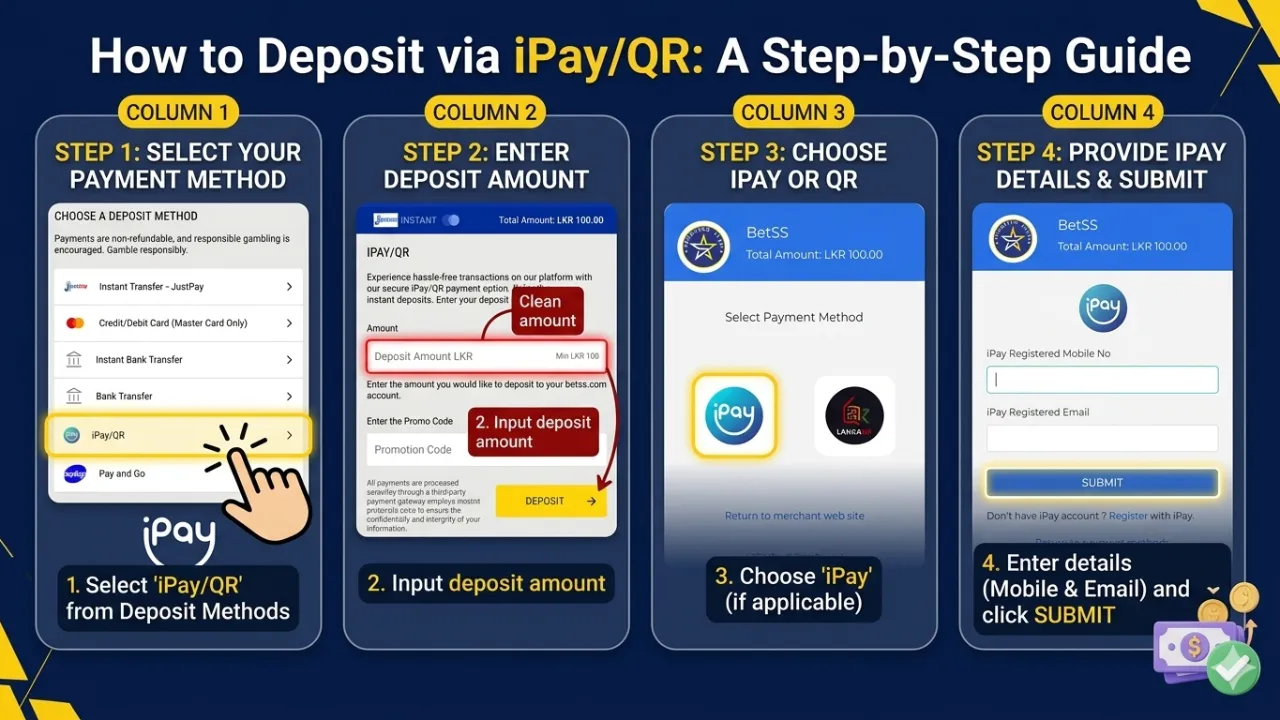
Depositing funds using iPay/QR is a fast and secure way to top up your account. Follow these steps to complete your transaction:
Step 1: Access the Deposit Section
Log in to your account and click the Deposit button. From the list of available payment options, select iPay/QR.

Step 2: Enter Deposit Amount
Input the amount you wish to deposit into your account.
- Minimum Deposit: LKR 100.

Step 3: Apply Promo Code (Optional)
If you have a promotional code, enter it in the designated field to unlock special bonuses and exclusive offers.
Choose iPay or QR
- Once redirected to the payment gateway, select the iPay option or the LankaQR option.
Step 4: Provide iPay Details
Once you proceed, you will be directed to the secure iPay gateway. You must provide:
- Your iPay registered mobile number.
- Your iPay registered email address.
- Click Submit to move forward.
Step 5: Complete the Payment
After a successful payment, your funds will be credited to your account balance instantly.
⚡ Essential Tips for a Successful Deposit
- Verify Amount: Double-check that the entered amount is correct before proceeding to the payment gateway.
- Maintain Connection: Do not refresh your browser or close the payment page while the transaction is processing.
- Confirmation: Ensure you receive a "Success" message from iPay to guarantee the funds have been sent.
🔐 Secure Transactions
Your safety is a priority. All iPay/QR transactions are protected with advanced encryption to ensure a smooth and hassle-free experience.

Tags:
#Deposit