What Should I Do If I Forgot My Password?
calendar_today
May 23, 2026
visibility
695 Views
language
English
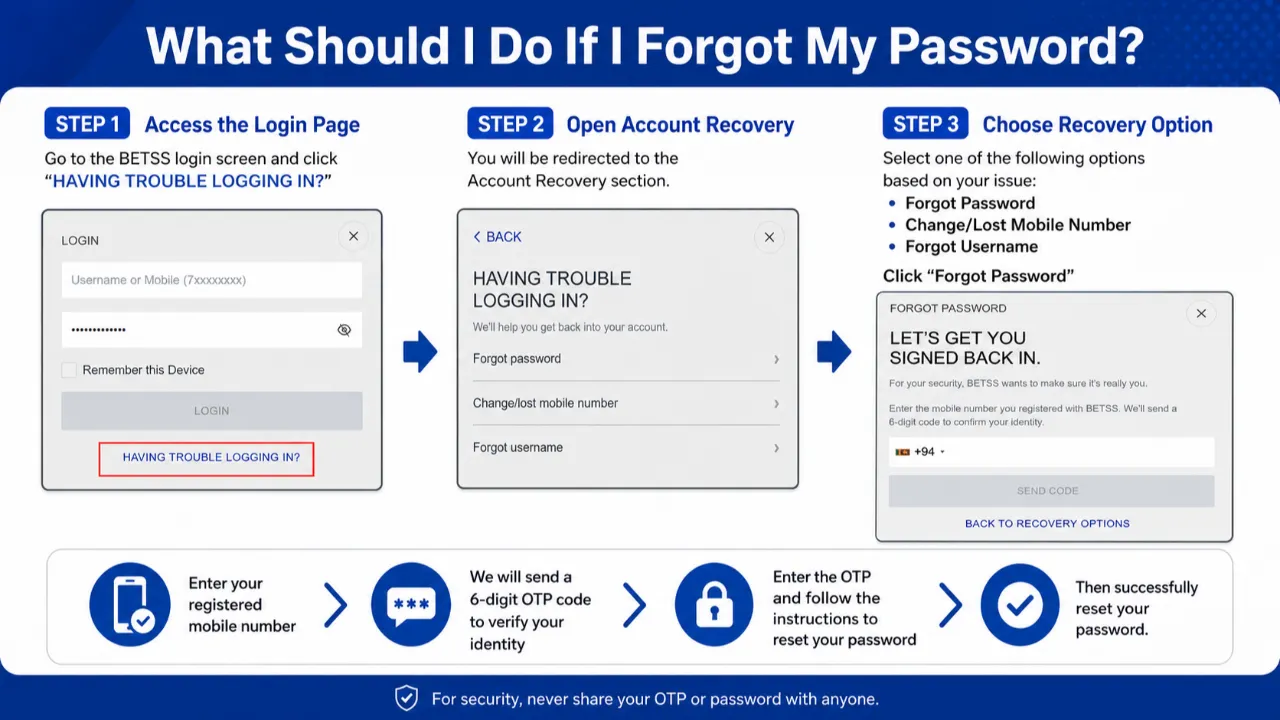
Forgot your BETSS account password? Don’t worry — recovering your account is quick and secure. Simply follow the steps below to reset your password and regain access to your account safely.
Step-by-Step Guide
Step 1:
Go to the BETSS login page and click “HAVING TROUBLE LOGGING IN?”

Step 2:
Select “Forgot Password” from the Account Recovery options.

Step 3:
Enter the mobile number linked to your BETSS account.
Step 4:
You will receive a 6-digit OTP verification code to your registered mobile number.
Step 5:
Enter the OTP correctly and follow the instructions to create a new password.
Important Notes
- Make sure your registered mobile number is active and accessible.
- Never share your OTP code with anyone for security reasons.
- Create a strong password using letters, numbers, and symbols for better account protection.
Final Message
Once the verification is completed successfully, your password will be updated instantly and you can log in to your BETSS account with your new password.
Tags:
#Login