Tag: #login

Step-by-step instructional modules for every platform feature.

සිංහල

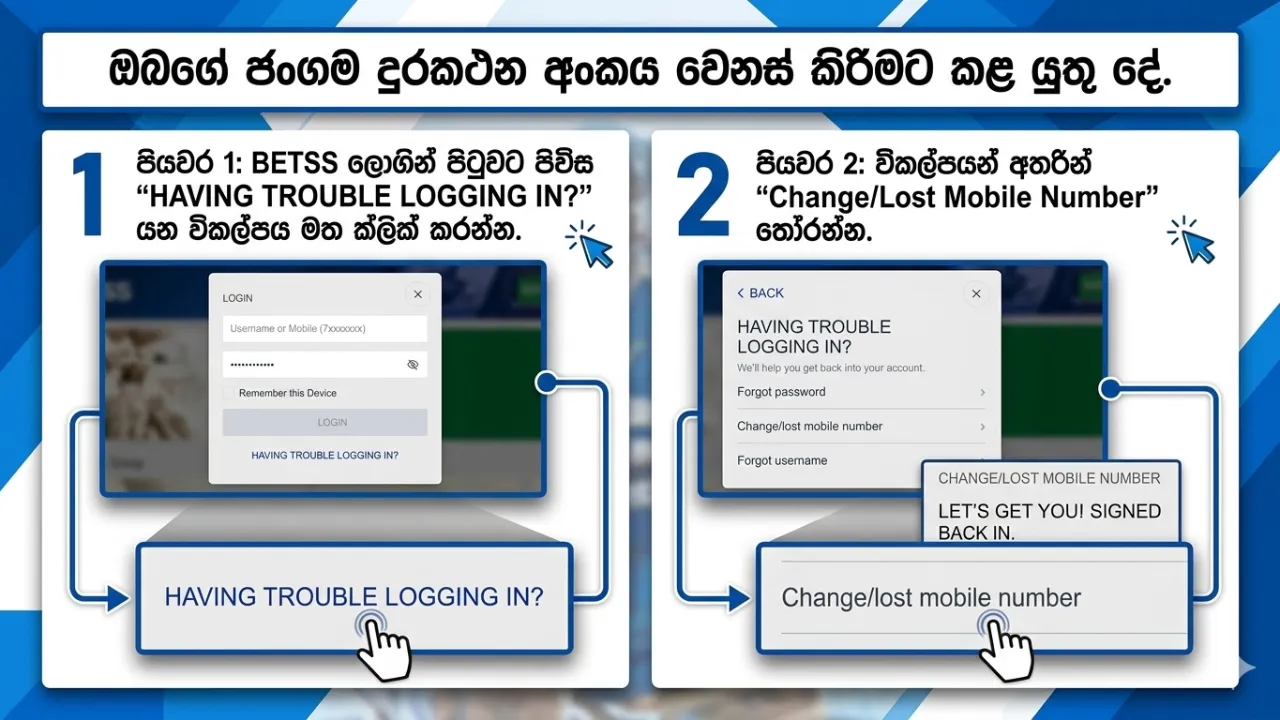
ඔබගේ ජංගම දුරකථන අංකය වෙනස් කිරීමට කළ යුතු දේ

ඔබගේ ජංගම දුරකථන අංකය වෙනස් කිරීමට හෝ එයට ප්‍රවේශය අහිමි වූ විට කළ යුතු දේ ඔබගේ ලියාපදිංචි ජංගම දුරකථන අංකයට ප්‍රවේශය නොමැති නම් හෝ නව අංකයක් යාවත්කාලීන කිරීමට අවශ්‍ය නම්, BETSS ඔබගේ ලියාපදිංචි විද්‍යුත් තැපැල් (Email) ලිපිනය හරහා ආරක්ෂිත ප්‍රතිසාධන (Recovery) ක්‍රමයක් ලබාදෙයි. පියවරෙන් පියවර මාර්ගෝපදේශය පියවර 1: BETSS ලොගින් පිටුවට පිවිස “HAVING TROUBLE LOGGING IN?” යන විකල්පය මත ක්ලික් කරන්න. පියවර 2: විකල්පයන් අතරින් “Change/Lost Mobile Number” තෝරන්න. පියවර 3: ඔබගේ BETSS ගිණුමට සම්බන්ධ කර ඇති විද්‍යුත් තැපැල් ලිපිනය ඇතුළත් කරන්න. පියවර 4: ඔබගේ ලියාපදිංචි Email ලිපිනයට OTP සත්‍යාපන කේතයක් (Verification Code) එවනු ලබයි. පියවර 5: එම OTP කේතය ඇතුළත් කර ලබාදෙන උපදෙස් අනුගමනය කර ඔබගේ නව ජංගම දුරකථන අංකය යාවත්කාලීන කරන්න. වැදගත් සටහන් මෙම ක්‍රියාවලිය භාවිතා කිරීමට ඔබගේ BETSS ගිණුමට ලියාපදිංචි Email ලිපිනයක් තිබිය යුතුය. ඔබ Email එකක් එකතු කර නොමැති නම්, ඔබගේ ගිණුමට ලොගින් වී My Account වෙත ගොස් Email එකක් එකතු කරන්න. සෑම විටම ආරක්ෂිත සහ ඔබට ප්‍රවේශය ඇති Email ලිපිනයක් භාවිතා කරන්න. අවසාන සටහන සාර්ථක සත්‍යාපනයෙන් පසු, ඔබගේ නව ජංගම දුරකථන අංකය ඔබගේ BETSS ගිණුමට ආරක්ෂිතව යාවත්කාලීන කරනු ලබයි.
Platform Guides
English

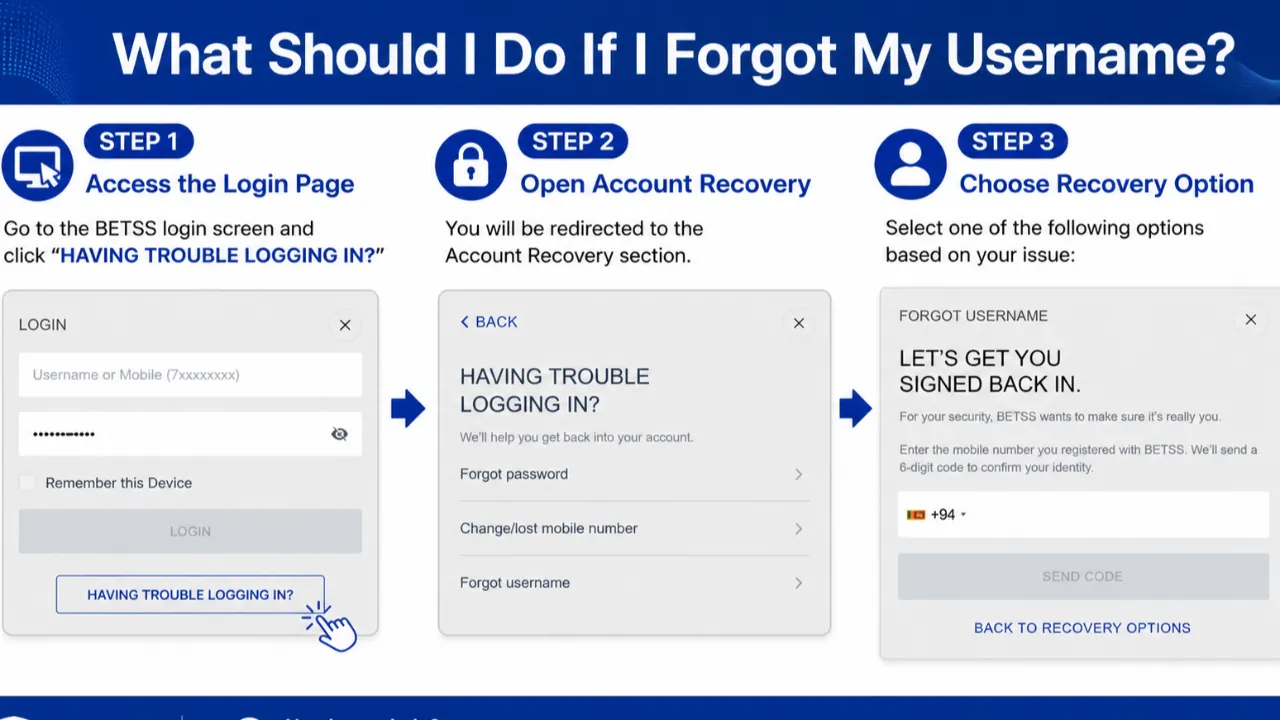
What Should I Do If I Forgot My Username?

Forget your BETSS username? No problem. You can quickly recover your username using your registered mobile number and OTP verification. Step-by-Step Guide Step 1: Open the BETSS login page and click “HAVING TROUBLE LOGGING IN?” Step 2: Select “Forgot Username” from the Account Recovery section. Step 3: Enter the mobile number registered with your BETSS account. Step 4: You will receive an OTP verification code to your mobile number. Step 5: Once verification is completed successfully, your BETSS username will be recovered and you can continue accessing your account without any issues. Important Notes Ensure the mobile number entered is the same number used during account registration. Keep your OTP confidential and never share it with anyone. After recovery, save your username securely for future logins  

Platform Guides
English

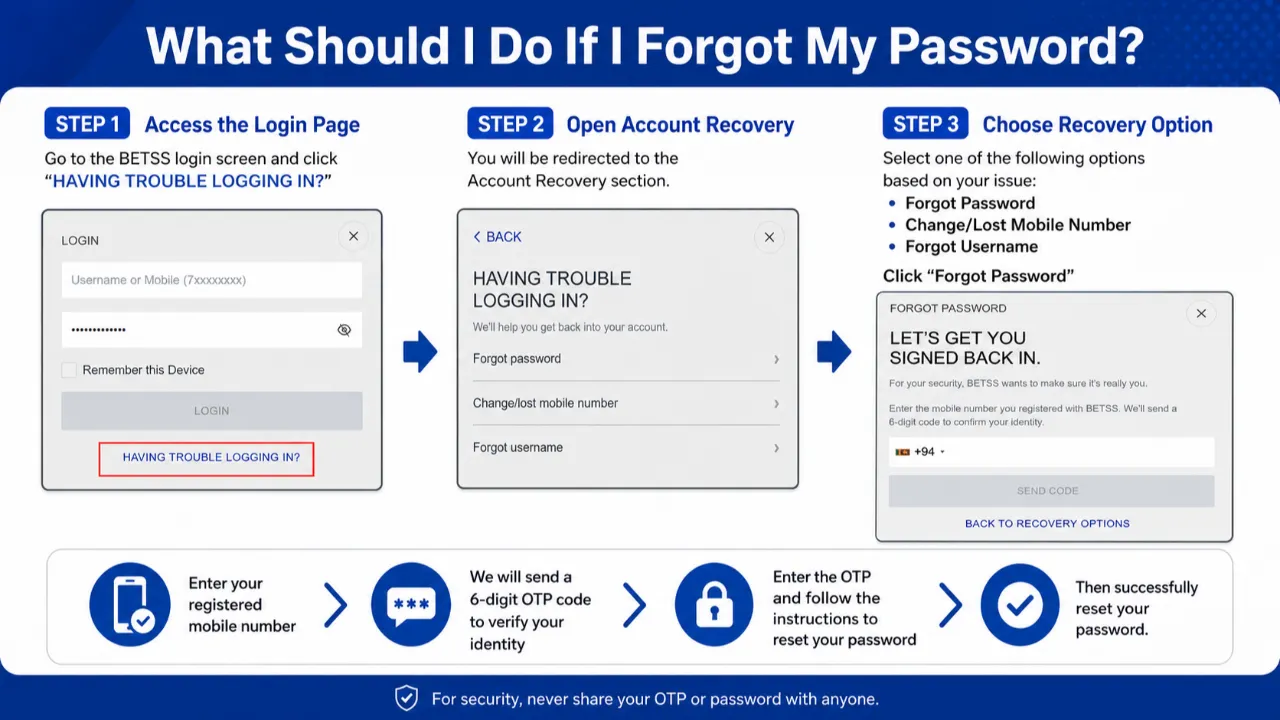
What Should I Do If I Forgot My Password?

Forgot your BETSS account password? Don’t worry — recovering your account is quick and secure. Simply follow the steps below to reset your password and regain access to your account safely. Step-by-Step Guide Step 1: Go to the BETSS login page and click “HAVING TROUBLE LOGGING IN?” Step 2: Select “Forgot Password” from the Account Recovery options. Step 3: Enter the mobile number linked to your BETSS account. Step 4: You will receive a 6-digit OTP verification code to your registered mobile number. Step 5: Enter the OTP correctly and follow the instructions to create a new password. Important Notes Make sure your registered mobile number is active and accessible. Never share your OTP code with anyone for security reasons. Create a strong password using letters, numbers, and symbols for better account protection. Final Message Once the verification is completed successfully, your password will be updated instantly and you can log in to your BETSS account with your new password.

Platform Guides
සිංහල

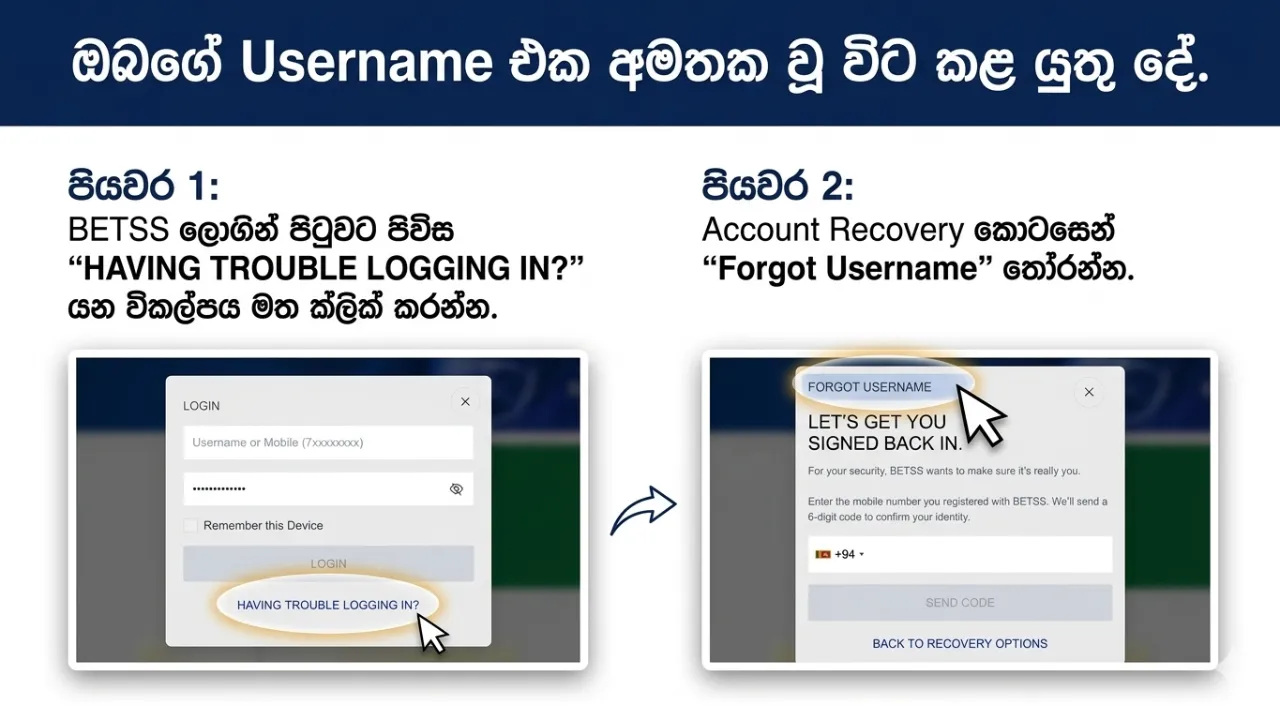
ඔබගේ Username එක අමතක වූ විට කළ යුතු දේ

ඔබගේ Username එක අමතක වූ විට කළ යුතු දේ ඔබගේ BETSS Username එක මතක නැති නම්, ගැටලුවක් නැත. ලියාපදිංචි ජංගම දුරකථන අංකය සහ OTP සත්‍යාපනය භාවිතයෙන් ඔබට පහසුවෙන් Username එක නැවත ලබාගත හැක. පියවරෙන් පියවර මාර්ගෝපදේශය පියවර 1: BETSS ලොගින් පිටුවට පිවිස “HAVING TROUBLE LOGGING IN?” යන විකල්පය මත ක්ලික් කරන්න. පියවර 2: Account Recovery කොටසෙන් “Forgot Username” තෝරන්න. පියවර 3: ඔබගේ BETSS ගිණුමට ලියාපදිංචි කර ඇති ජංගම දුරකථන අංකය ඇතුළත් කරන්න. පියවර 4: ඔබගේ ජංගම දුරකථන අංකයට OTP සත්‍යාපන කේතයක් ලැබේ. පියවර 5: සාර්ථක සත්‍යාපනයෙන් පසු, ඔබගේ BETSS Username එක නැවත ලබා දෙන අතර, ඔබට කිසිදු බාධාවකින් තොරව ඔබගේ ගිණුමට ප්‍රවේශ විය හැක. වැදගත් සටහන් ඇතුළත් කරන ජංගම දුරකථන අංකය ලියාපදිංචි කළ එකම අංකය විය යුතුය. OTP කිසිවිටෙකත් වෙනත් අය සමඟ බෙදා නොගන්න. Username එක නැවත ලබාගත් පසු, එය ආරක්ෂිතව සුරකින්න.

සිංහල

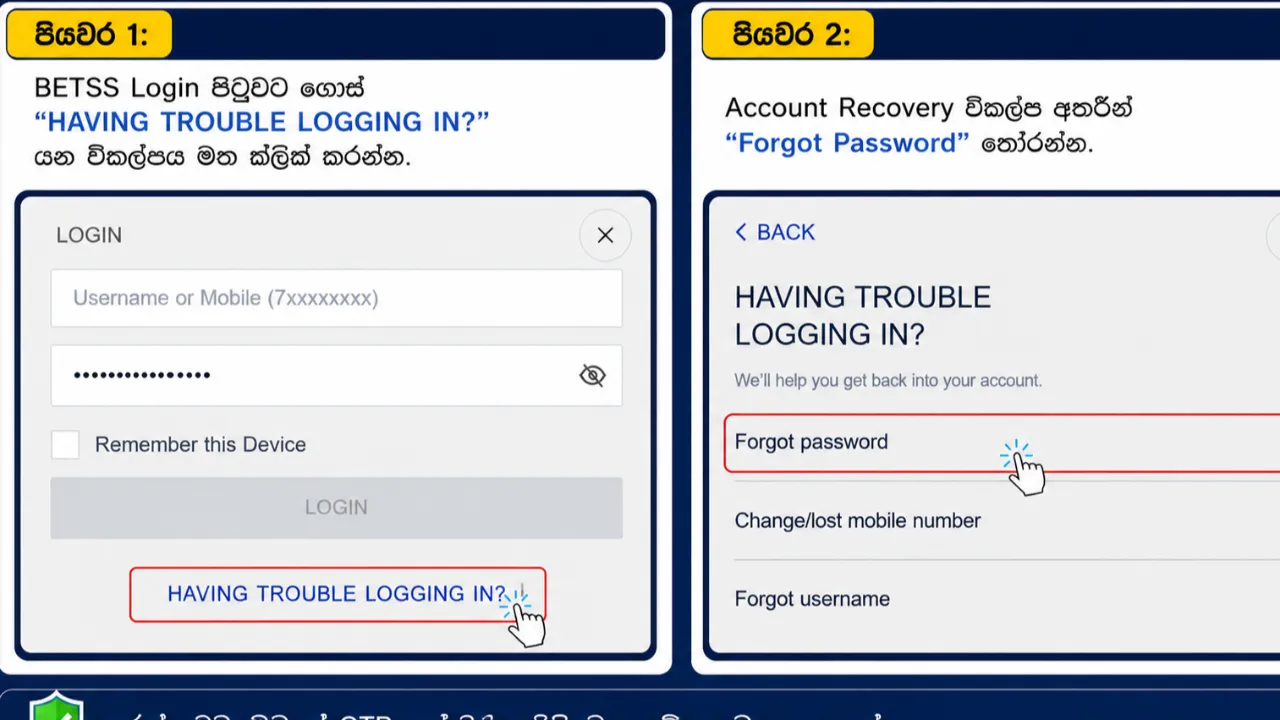
ඔබගේ Password අමතක වූ විට කළ යුත්තේ කුමක්ද?

  Password අමතක වුණාද? ඔබගේ BETSS ගිණුමේ password අමතක වුණාද? කලබල වෙන්න එපා ... ඔබගේ ගිණුම නැවත ලබාගැනීම ඉක්මන් සහ ආරක්ෂිත ක්‍රියාවලියකි. පහත සඳහන් සරල පියවර අනුගමනය කර ඔබගේ password නැවත සකසා ගිණුමට ආරක්ෂිතව පිවිසෙන්න. පියවරෙන් පියවර මාර්ගෝපදේශය පියවර 1: BETSS Login පිටුවට ගොස් “HAVING TROUBLE LOGGING IN?” යන විකල්පය මත ක්ලික් කරන්න. පියවර 2: Account Recovery විකල්ප අතරින් “Forgot Password” තෝරන්න. පියවර 3: ඔබගේ BETSS ගිණුමට සම්බන්ධ කර ඇති ජංගම දුරකථන අංකය ඇතුළත් කරන්න. පියවර 4: ඔබගේ ලියාපදිංචි ජංගම අංකයට අංක 6ක OTP තහවුරු කිරීමේ කේතයක් ලැබෙනු ඇත. පියවර 5: ලැබුණු OTP කේතය නිවැරදිව ඇතුළත් කර, නව password එකක් සෑදීම සඳහා ලබාදෙන උපදෙස් අනුගමනය කරන්න. වැදගත් කරුණු ✅ ඔබගේ ලියාපදිංචි ජංගම දුරකථන අංකය සක්‍රීය සහ භාවිතයට තිබෙන බව තහවුරු කරගන්න. ✅ ආරක්ෂාව සඳහා ඔබගේ OTP කේතය කිසිවෙකු සමඟ බෙදා නොගන්න. ✅ ගිණුමේ ආරක්ෂාව වැඩිදියුණු කිරීම සඳහා අකුරු, අංක සහ සංකේත අඩංගු ශක්තිමත් මුරපදයක් භාවිතා කරන්න. අවසාන සටහන තහවුරු කිරීමේ ක්‍රියාවලිය සාර්ථකව අවසන් වූ පසු, ඔබගේ Password ක්ෂණිකව යාවත්කාලීන වන අතර නව password  භාවිතා කර නැවත ඔබගේ BETSS ගිණුමට පිවිසිය හැක.

Platform Guides
English

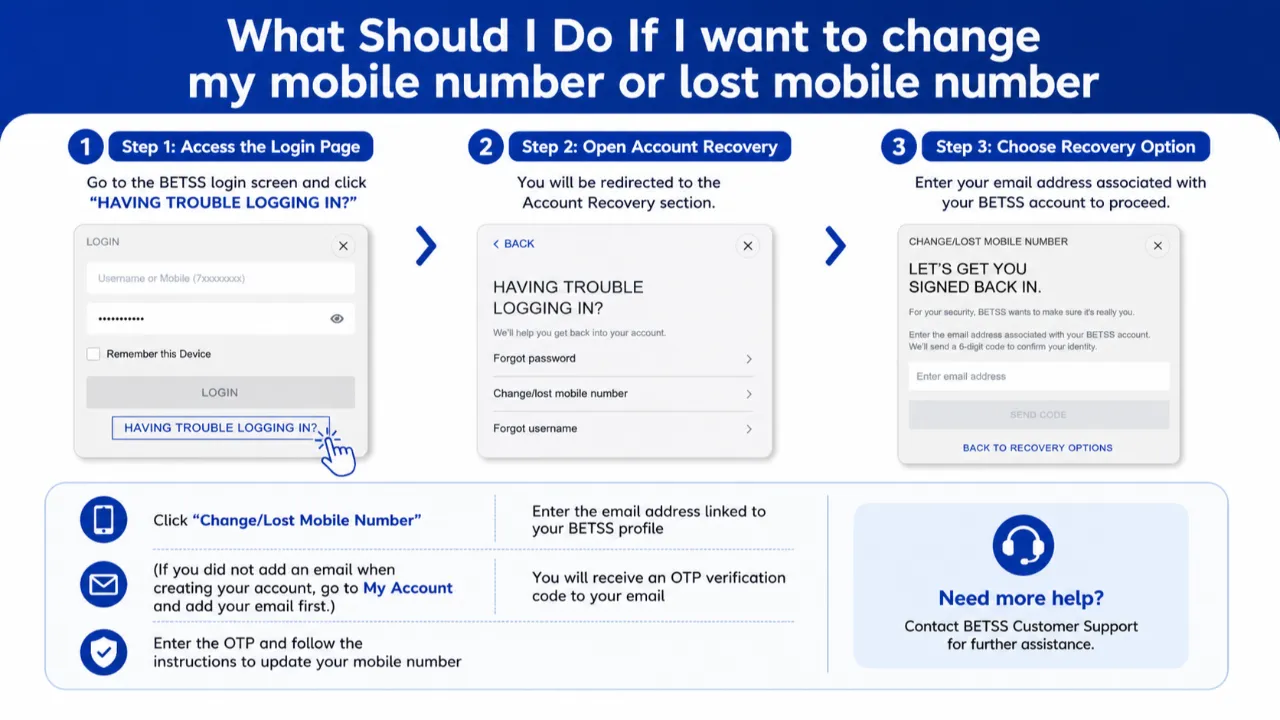
What Should I Do If I Want to Change My Mobile Number or Lost Access to It?

If you no longer have access to your registered mobile number or wish to update it with a new number, BETSS provides a secure recovery method through your registered email address. Step-by-Step Guide Step 1: Visit the BETSS login page and click “HAVING TROUBLE LOGGING IN?” Step 2: Choose “Change/Lost Mobile Number” from the recovery options. Step 3: Enter the email address connected to your BETSS account. Step 4: An OTP verification code will be sent to your registered email address. Step 5: Enter the OTP code and follow the instructions to update your mobile number securely. Important Notes Your BETSS account must have a registered email address to use this recovery option. If you have not added an email yet, log in to your account, go to My Account, and add your email address before using this feature. Always use an active and accessible email address for account security. Final Message After successful verification, your mobile number will be updated and linked securely to your BETSS account.

check_circle