What Should I Do If I Want to Change My Mobile Number or Lost Access to It?
calendar_today
May 22, 2026
visibility
239 Views
language
English
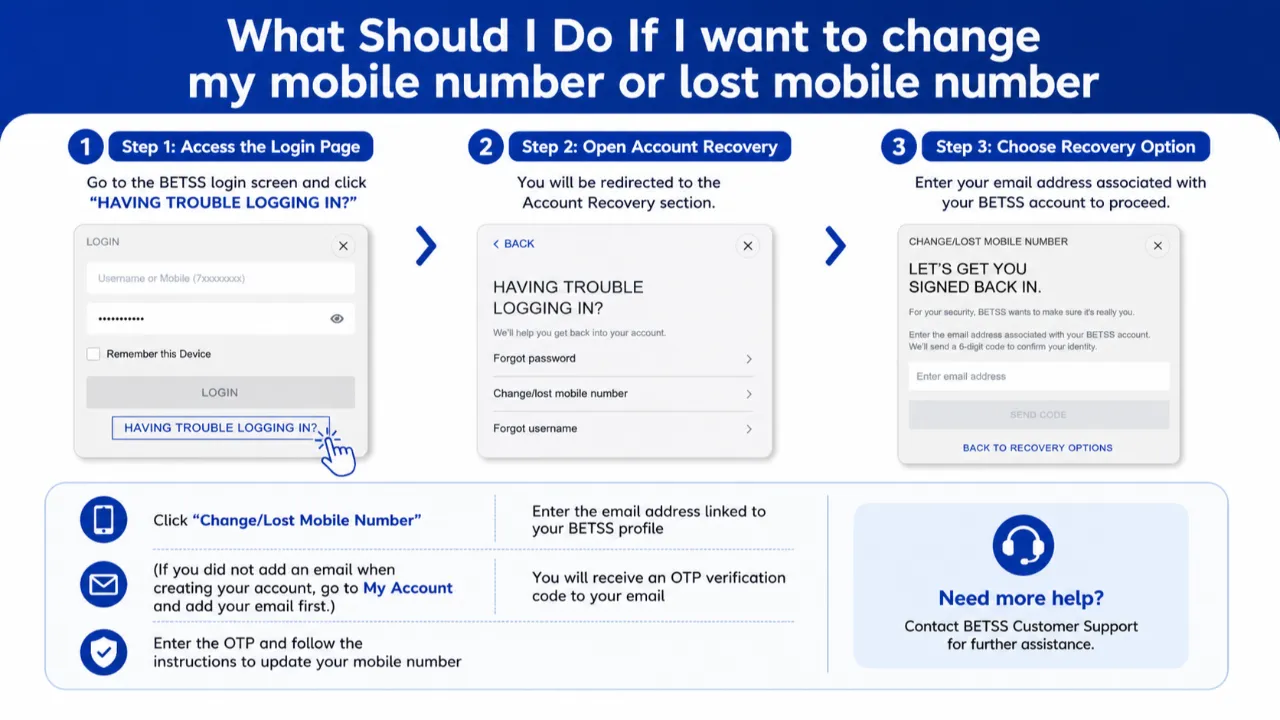
If you no longer have access to your registered mobile number or wish to update it with a new number, BETSS provides a secure recovery method through your registered email address.
Step-by-Step Guide
Step 1:
Visit the BETSS login page and click “HAVING TROUBLE LOGGING IN?”
Step 2:
Choose “Change/Lost Mobile Number” from the recovery options.
Step 3:
Enter the email address connected to your BETSS account.
Step 4:
An OTP verification code will be sent to your registered email address.
Step 5:
Enter the OTP code and follow the instructions to update your mobile number securely.
Important Notes
- Your BETSS account must have a registered email address to use this recovery option.
- If you have not added an email yet, log in to your account, go to My Account, and add your email address before using this feature.
- Always use an active and accessible email address for account security.
Final Message
After successful verification, your mobile number will be updated and linked securely to your BETSS account.
Tags:
#Login